> ## Documentation Index
> Fetch the complete documentation index at: https://docs.inferless.com/llms.txt
> Use this file to discover all available pages before exploring further.
# Deploy the YOLO11m model using Inferless
> YOLO11m is a medium-sized variant of the YOLO11 family, designed to balance accuracy and computational efficiency for object detection tasks.
## Introduction
[YOLO11m](https://docs.ultralytics.com/models/yolo11/) is a state-of-the-art object detection model from YOLO11 series, offering a balanced trade-off between accuracy and computational efficiency. It introduces architectural innovations like the C3k2 block for efficient computation, SPPF for multi-scale feature aggregation, and C2PSA for enhanced spatial attention, leading to improved detection performance.
With approximately `20.09` million parameters, YOLO11m achieves higher `mAP@75 0.538` on benchmarks like the COCO dataset while maintaining a compact model size, making it suitable for real-time applications on devices with limited computational resources. Its versatility extends to various computer vision tasks, including object detection, instance segmentation, image classification, pose estimation, and oriented object detection (OBB).
## Defining Dependencies
We are using the [ultralytics](https://github.com/ultralytics/ultralytics) to serve the model on a single A100 (80GB).
## Constructing the GitHub/GitLab Template
Now quickly construct the GitHub/GitLab template, this process is mandatory and make sure you don't add any file named `model.py`.
```
yolo11m-detect/
├── app.py
├── inferless-runtime-config.yaml
└── inferless.yaml
```
You can also add other files to this directory.
## Create the Input Schema with Pydantic
Using the `inferless` Python client and Pydantic, you can define structured schemas directly in your code for input and output, eliminating the need for external file.
### Input Schema
When defining an input schema with Pydantic, you need to annotate your class attributes with the appropriate types, such as `str`, `float`, `int`, etc.
These type annotations specifys what type of data each field should contain.
The `default` value serves as the example input for testing with the `infer` function.
```python theme={null}
@inferless.request
class RequestObjects(BaseModel):
image_url: str = Field(default="https://github.com/rbgo404/Files/raw/main/photo-1517732306149-e8f829eb588a.jpeg")
confidence_threshold: Optional[float] = Field(default=0.25)
```
### Output Schema
The `@inferless.response` decorator helps you define structured output schemas.
```python theme={null}
@inferless.response
class ResponseObject(BaseModel):
boxes: List[float] = []
confidences: List[float] = []
class_ids: List[float]= []
class_names: List[str] = []
annotated_image_base64_str: str = "Test output"
```
### Usage in the `infer` Function
Once you have annotated the objects you can expect the infer function to receive `RequestObjects` as input,
and returns a `ResponseObjects` instance as output, ensuring the results adhere to a defined structure.
```python theme={null}
class InferlessPythonModel:
def infer(self, request: RequestObjects) -> ResponseObjects:
return ResponseObject(**return_result)
```
## Create the class for inference
In the [app.py](https://github.com/inferless/yolo11m-detect/blob/main/app.py) we will define the class and import all the required functions
1. `def initialize`: In this function, you will initialize your model and define any `variable` that you want to use during inference.
2. `def infer`: This function gets called for every request that you send. Here you can define all the steps that are required for the inference.
3. `def finalize`: This function cleans up all the allocated memory.
```python theme={null}
import os
import requests
import torch
import inferless
from pydantic import BaseModel, Field
from typing import Optional, List
from ultralytics import YOLO
import cv2
import base64
@inferless.request
class RequestObjects(BaseModel):
image_url: str = Field(default="https://github.com/rbgo404/Files/raw/main/photo-1517732306149-e8f829eb588a.jpeg")
confidence_threshold: Optional[float] = Field(default=0.25)
@inferless.response
class ResponseObject(BaseModel):
boxes: List[float] = []
confidences: List[float] = []
class_ids: List[float]= []
class_names: List[str] = []
annotated_image_base64_str: str = "Test output"
class InferlessPythonModel:
@staticmethod
def download_file(url: str, save_path: str) -> bool:
os.makedirs(os.path.dirname(save_path), exist_ok=True)
if os.path.exists(save_path):
return True
response = requests.get(url, stream=True, timeout=30)
response.raise_for_status()
total_size = int(response.headers.get('content-length', 0))
block_size = 8192
with open(save_path, 'wb') as f:
for data in response.iter_content(block_size):
f.write(data)
return True
def initialize(self, context=None):
self.model_weights_url = "https://github.com/ultralytics/assets/releases/download/v8.3.0/yolo11m.pt"
models_dir = os.path.join(os.getcwd(), "models_yolo")
self.model_save_path = os.path.join(models_dir, "yolo11m.pt")
if self.download_file(self.model_weights_url, self.model_save_path):
self.model = YOLO(self.model_save_path)
self.model.to("cuda")
def infer(self, request: RequestObjects) -> ResponseObject:
results = self.model.predict(source=request.image_url,conf=request.confidence_threshold,device="cuda")
return_result = {"boxes": [], "confidences": [], "class_ids": [], "class_names": [], "annotated_image_base64_str": ""}
result = results[0]
return_result["boxes"] = result.boxes.xyxyn.flatten().tolist()
return_result["confidences"] = result.boxes.conf.tolist()
return_result["class_ids"] = result.boxes.cls.tolist()
return_result["class_names"] = [result.names[int(cls_id)] for cls_id in return_result["class_ids"]]
annotated_image_np = result.plot()
is_success, im_buf_arr = cv2.imencode(".jpg", annotated_image_np)
byte_im = im_buf_arr.tobytes()
return_result["annotated_image_base64_str"] = base64.b64encode(byte_im).decode('utf-8')
return ResponseObject(**return_result)
def finalize(self):
self.model = None
```
## Creating the Custom Runtime
This is a mandatory step where we allow the users to upload their custom runtime through [inferless-runtime-config.yaml](https://github.com/inferless/yolo11m-detect/blob/main/inferless-runtime-config.yaml).
```python theme={null}
build:
system_packages:
- "libsm6"
- "ffmpeg"
- "libxext6"
python_packages:
- "ultralytics==8.3.140"
- "torch==2.7.0"
- "torchvision==0.22.0"
- "inferless==0.2.13"
- "pydantic==2.10.2"
```
## Test your model with Remote Run
You can use the `inferless remote-run`([installation guide here](https://docs.inferless.com/model-import/cli-import#cli-import)) command to test your model or any custom Python script in a remote GPU environment directly from your local machine. Make sure that you use `Python3.10` for seamless experience.
### Step 1: Add the Decorators and local entry point
To enable **Remote Run**, simply do the following:
1. Import the `inferless` library and initialize `Cls(gpu="A10")`. The available GPU options are `T4`, `A10` and `A100`.
2. Decorated the `initialize` and `infer` functions with `@app.load` and `@app.infer` respectively.
3. Create the Local Entry Point by decorating a function (for example, `my_local_entry`) with `@inferless.local_entry_point`.
Within this function, instantiate your model class, convert any incoming parameters into a `RequestObjects` object, and invoke the model's `infer` method.
```python theme={null}
import os
import requests
import torch
import inferless
from pydantic import BaseModel, Field
from typing import Optional, List
import cv2
import base64
@inferless.request
class RequestObjects(BaseModel):
image_url: str = Field(default="https://github.com/rbgo404/Files/raw/main/photo-1517732306149-e8f829eb588a.jpeg")
confidence_threshold: Optional[float] = Field(default=0.25)
@inferless.response
class ResponseObject(BaseModel):
boxes: List[float] = []
confidences: List[float] = []
class_ids: List[float]= []
class_names: List[str] = []
annotated_image_base64_str: str = "Test output"
app = inferless.Cls(gpu="A10")
class InferlessPythonModel:
@staticmethod
def download_file(url: str, save_path: str) -> bool:
os.makedirs(os.path.dirname(save_path), exist_ok=True)
if os.path.exists(save_path):
return True
response = requests.get(url, stream=True, timeout=30)
response.raise_for_status()
total_size = int(response.headers.get('content-length', 0))
block_size = 8192
with open(save_path, 'wb') as f:
for data in response.iter_content(block_size):
f.write(data)
return True
@app.load
def initialize(self, context=None):
from ultralytics import YOLO
self.model_weights_url = "https://github.com/ultralytics/assets/releases/download/v8.3.0/yolo11m.pt"
models_dir = os.path.join(os.getcwd(), "models_yolo")
self.model_save_path = os.path.join(models_dir, "yolo11m.pt")
if self.download_file(self.model_weights_url, self.model_save_path):
self.model = YOLO(self.model_save_path)
self.model.to("cuda")
@app.infer
def infer(self, request: RequestObjects) -> ResponseObject:
results = self.model.predict(source=request.image_url,conf=request.confidence_threshold,device="cuda")
return_result = {"boxes": [], "confidences": [], "class_ids": [], "class_names": [], "annotated_image_base64_str": ""}
result = results[0]
return_result["boxes"] = result.boxes.xyxyn.flatten().tolist()
return_result["confidences"] = result.boxes.conf.tolist()
return_result["class_ids"] = result.boxes.cls.tolist()
return_result["class_names"] = [result.names[int(cls_id)] for cls_id in return_result["class_ids"]]
annotated_image_np = result.plot()
is_success, im_buf_arr = cv2.imencode(".jpg", annotated_image_np)
byte_im = im_buf_arr.tobytes()
return_result["annotated_image_base64_str"] = base64.b64encode(byte_im).decode('utf-8')[:100]
return ResponseObject(**return_result)
def finalize(self):
self.model = None
@inferless.local_entry_point
def my_local_entry(dynamic_params):
request_objects = RequestObjects(**dynamic_params)
model_instance = InferlessPythonModel()
return model_instance.infer(request_objects)
```
### Step 2: Run with Remote GPU
From your local terminal, navigate to the folder containing your `app.py` and your `inferless-runtime-config.yaml` and run:
```bash theme={null}
inferless remote-run app.py -c inferless-runtime-config.yaml --image_url "https://github.com/rbgo404/Files/raw/main/photo-1517732306149-e8f829eb588a.jpeg"
```
You can pass the other input parameters in the same way (e.g., `--confidence_threshold`, etc.) as long as your code expects them in the `inputs` dictionary.
If you want to exclude certain files or directories from being uploaded, use the `--exclude` or `-e` flag.
## Method A: Deploying the model on Inferless Platform
Inferless supports multiple ways of [importing your model](https://docs.inferless.com/model-import/file-structure-req/file-structure-requirements). For this tutorial, we will use GitHub.
### Step 1: Login to the inferless dashboard can click on Import model button
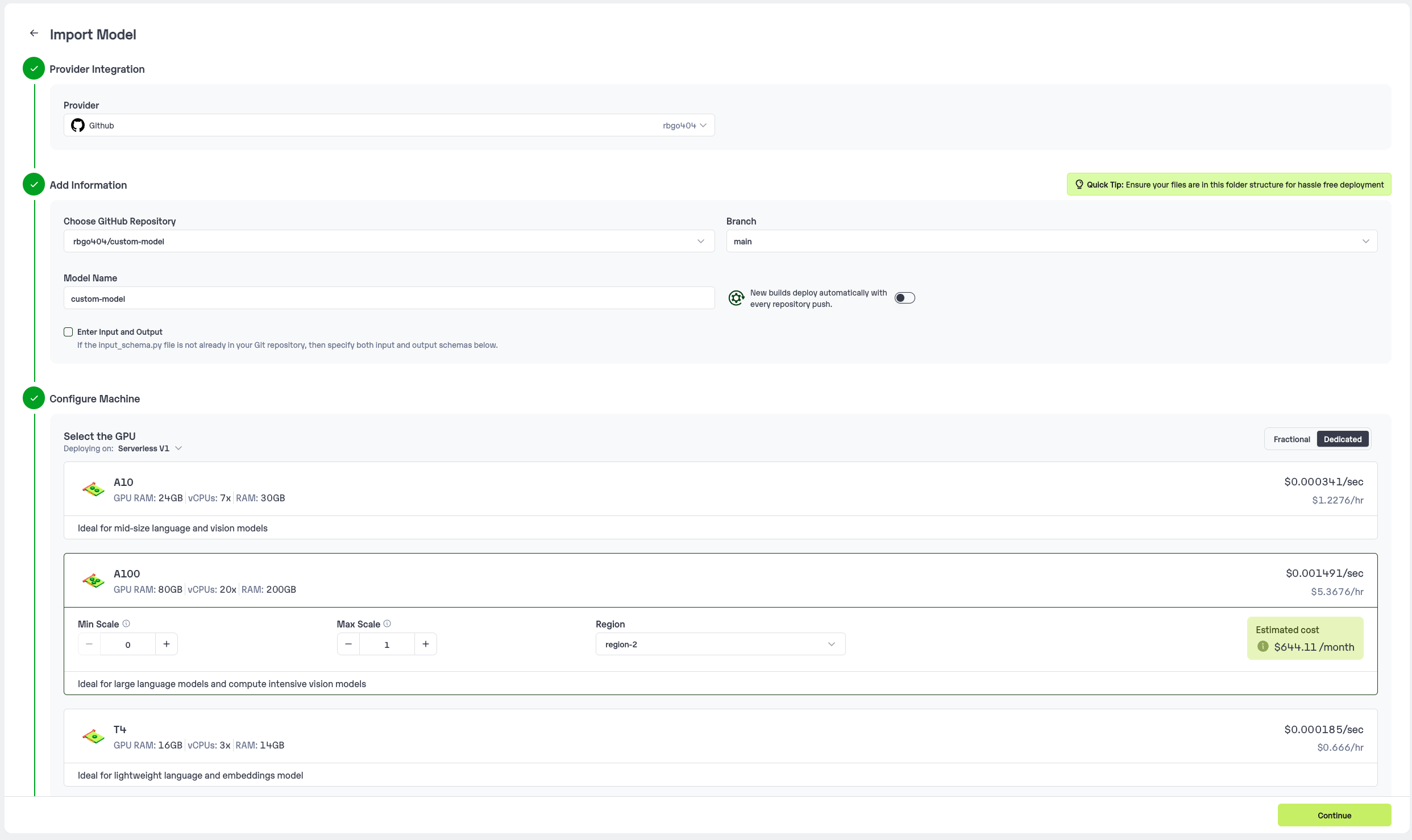
Navigate to your desired workspace in Inferless and Click on `Add a custom model` button that you see on the top right. An import wizard will open up.
### Step 2: Follow the UI to complete the model Import
* Select the GitHub/GitLab Integration option to connect your source code repository with the deployment environment.
* Navigate to the specific GitHub repository that contains your model's code. Here, you will need to identify and enter the name of the model you wish to import.
* Choose the appropriate type of machine that suits your model's requirements. Additionally, specify the minimum and maximum number of replicas to define the scalability range for deploying your model.
* Optionally, you have the option to enable automatic build and deployment. This feature triggers a new deployment automatically whenever there is a new code push to your repository.
* If your model requires additional software packages, configure the Custom Runtime settings by including necessary pip or apt packages. Also, set up environment variables such as Inference Timeout, Container Concurrency, and Scale Down Timeout to tailor the runtime environment according to your needs.
* Wait for the validation process to complete, ensuring that all settings are correct and functional. Once validation is successful, click on the "Import" button to finalize the import of your model.
 ### Step 3: Wait for the model build to complete usually takes \~5-10 minutes
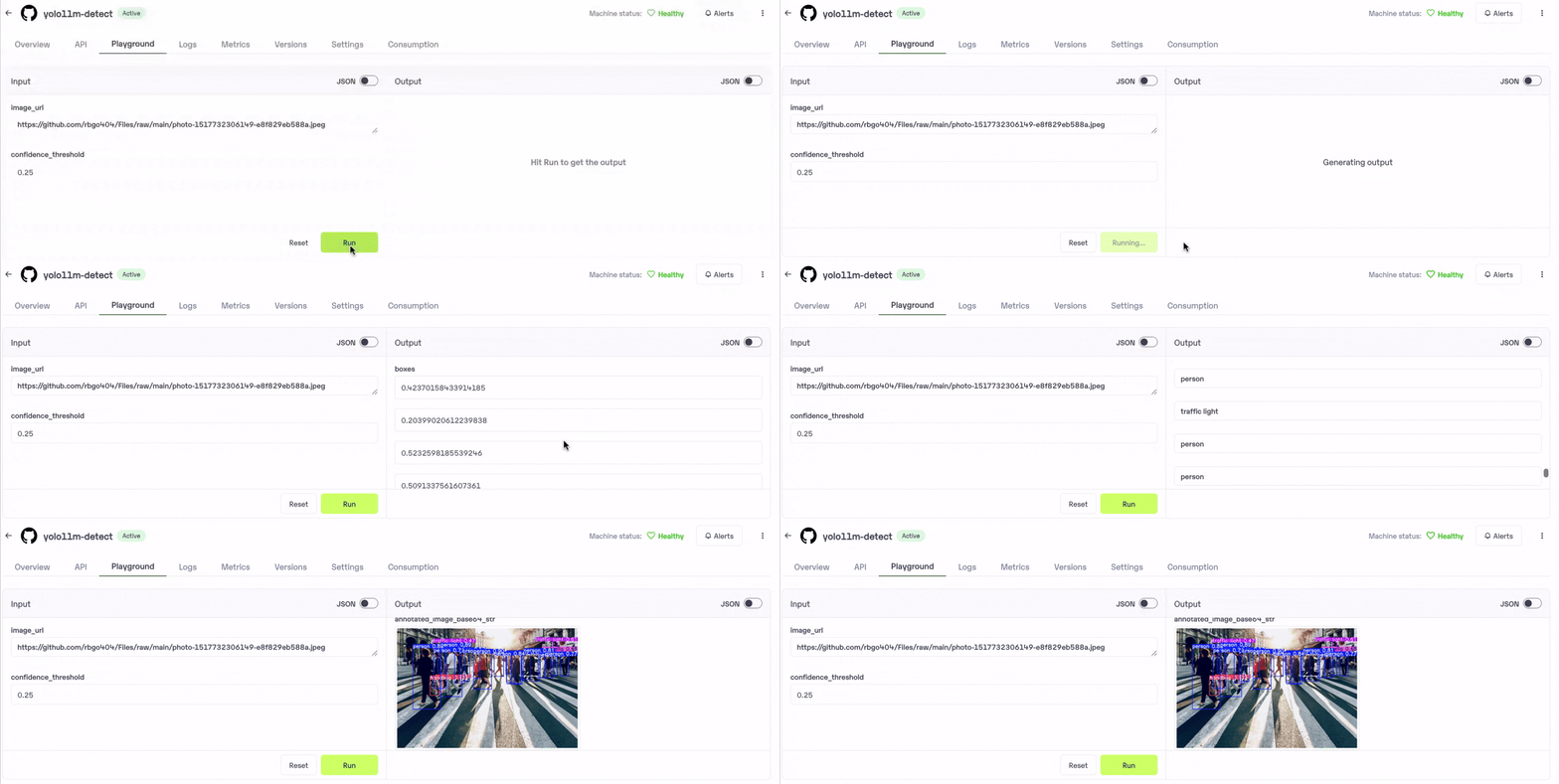
### Step 4: Use the APIs to call the model
Once the model is in 'Active' status you can click on the 'API' page to call the model
### Here is the Demo:
### Step 3: Wait for the model build to complete usually takes \~5-10 minutes
### Step 4: Use the APIs to call the model
Once the model is in 'Active' status you can click on the 'API' page to call the model
### Here is the Demo:
 ## Method B: Deploying the model on Inferless CLI
Inferless allows you to deploy your model using Inferless-CLI. Follow the steps to deploy using Inferless CLI.
### Clone the repository of the model
Let's begin by cloning the model repository:
```bash theme={null}
git clone https://github.com/inferless/yolo11m-detect.git
```
### Deploy the Model
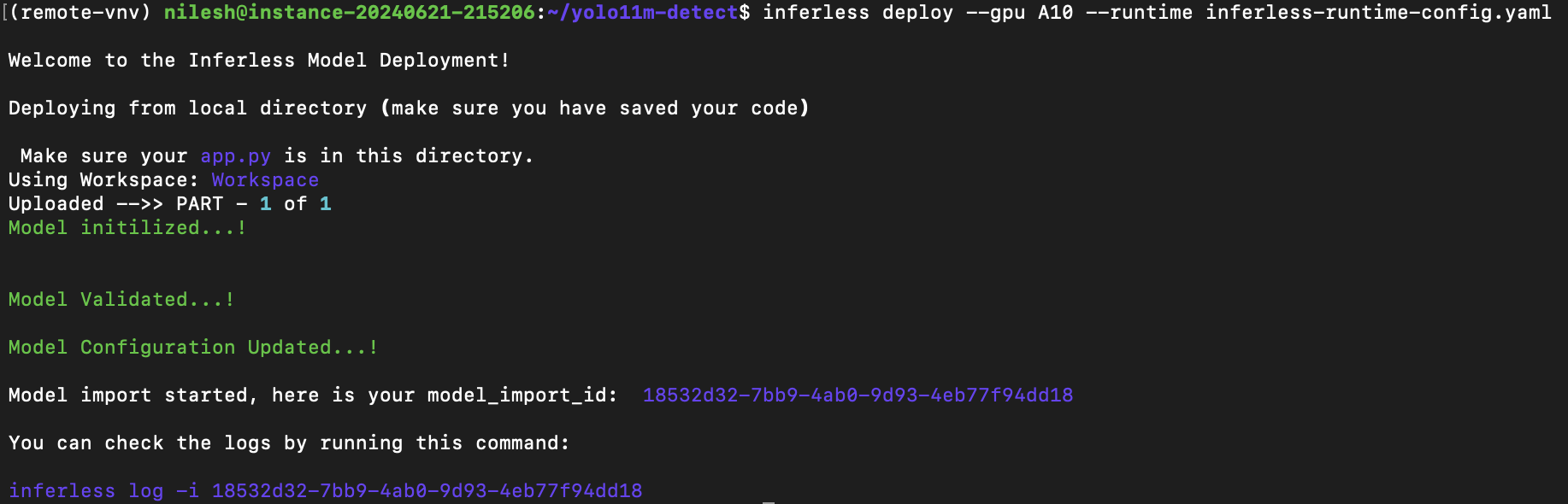
To deploy the model using Inferless CLI, execute the following command:
```bash theme={null}
inferless deploy --gpu A10 --runtime inferless-runtime-config.yaml
```
**Explanation of the Command:**
* `--gpu A10`: Specifies the GPU type for deployment. Available options include `A10`, `A100`, and `T4`.
* `--runtime inferless-runtime-config.yaml`: Defines the runtime configuration file. If not specified, the default Inferless runtime is used.
## Method B: Deploying the model on Inferless CLI
Inferless allows you to deploy your model using Inferless-CLI. Follow the steps to deploy using Inferless CLI.
### Clone the repository of the model
Let's begin by cloning the model repository:
```bash theme={null}
git clone https://github.com/inferless/yolo11m-detect.git
```
### Deploy the Model
To deploy the model using Inferless CLI, execute the following command:
```bash theme={null}
inferless deploy --gpu A10 --runtime inferless-runtime-config.yaml
```
**Explanation of the Command:**
* `--gpu A10`: Specifies the GPU type for deployment. Available options include `A10`, `A100`, and `T4`.
* `--runtime inferless-runtime-config.yaml`: Defines the runtime configuration file. If not specified, the default Inferless runtime is used.