> ## Documentation Index
> Fetch the complete documentation index at: https://docs.inferless.com/llms.txt
> Use this file to discover all available pages before exploring further.
# Deploy the Nanonets-OCR-s model using Inferless
> An vision-language OCR model fine-tuned from Qwen 2.5-VL-3B that turns documents and images into structured Markdown including tables, LaTeX equations, check-boxes and tagged watermarks, ready for downstream LLM workflows.
## Introduction
[Nanonets-OCR-s](https://huggingface.co/nanonets/Nanonets-OCR-s) is an open-source, 3-parameter vision-language model that turns scanned pages and PDFs directly into richly structured Markdown instead of flat text. It preserves tables as HTML, renders equations in LaTeX, tags check-boxes with ☐/☑, wraps page numbers and watermarks in explicit tags, and even inserts image captions or auto-generated descriptions inside `![]() ` elements—producing outputs that are ready for downstream LLM or RAG pipelines.
Under the hood, Nanonets-OCR-s is fine-tuned from the Qwen 2.5-VL-3B-Instruct backbone, inheriting that model’s strong multimodal reasoning and layout-aware capabilities. This choice gives the OCR system a compact size that still fits on a single consumer GPU while reaching state-of-the-art accuracy on complex documents. Community posts and the official announcement highlight that the entire 3 B stack is released under the Apache-2.0 licence, making it free to self-host, fine-tune or embed in commercial workflows.
## Defining Dependencies
We are using the [transformers](https://github.com/huggingface/transformers) to serve the model on a single A100 (80GB).
## Constructing the GitHub/GitLab Template
Now quickly construct the GitHub/GitLab template, this process is mandatory and make sure you don't add any file named `model.py`.
```
nanonets-ocr-s/
├── app.py
├── inferless-runtime-config.yaml
└── inferless.yaml
```
You can also add other files to this directory.
## Create the Input Schema with Pydantic
Using the `inferless` Python client and Pydantic, you can define structured schemas directly in your code for input and output, eliminating the need for external file.
### Input Schema
When defining an input schema with Pydantic, you need to annotate your class attributes with the appropriate types, such as `str`, `float`, `int`, `bool` etc.
These type annotations specifys what type of data each field should contain.
The `default` value serves as the example input for testing with the `infer` function.
```python theme={null}
@inferless.request
class RequestObjects(BaseModel):
image_url: str = Field(default="https://github.com/NanoNets/docext/raw/main/assets/invoice_test.jpeg")
prompt: str = Field(default="""Extract the text from the above document as if you were reading it naturally. Return the tables in html format. Return the equations in LaTeX representation. If there is an image in the document and image caption is not present, add a small description of the image inside the
` elements—producing outputs that are ready for downstream LLM or RAG pipelines.
Under the hood, Nanonets-OCR-s is fine-tuned from the Qwen 2.5-VL-3B-Instruct backbone, inheriting that model’s strong multimodal reasoning and layout-aware capabilities. This choice gives the OCR system a compact size that still fits on a single consumer GPU while reaching state-of-the-art accuracy on complex documents. Community posts and the official announcement highlight that the entire 3 B stack is released under the Apache-2.0 licence, making it free to self-host, fine-tune or embed in commercial workflows.
## Defining Dependencies
We are using the [transformers](https://github.com/huggingface/transformers) to serve the model on a single A100 (80GB).
## Constructing the GitHub/GitLab Template
Now quickly construct the GitHub/GitLab template, this process is mandatory and make sure you don't add any file named `model.py`.
```
nanonets-ocr-s/
├── app.py
├── inferless-runtime-config.yaml
└── inferless.yaml
```
You can also add other files to this directory.
## Create the Input Schema with Pydantic
Using the `inferless` Python client and Pydantic, you can define structured schemas directly in your code for input and output, eliminating the need for external file.
### Input Schema
When defining an input schema with Pydantic, you need to annotate your class attributes with the appropriate types, such as `str`, `float`, `int`, `bool` etc.
These type annotations specifys what type of data each field should contain.
The `default` value serves as the example input for testing with the `infer` function.
```python theme={null}
@inferless.request
class RequestObjects(BaseModel):
image_url: str = Field(default="https://github.com/NanoNets/docext/raw/main/assets/invoice_test.jpeg")
prompt: str = Field(default="""Extract the text from the above document as if you were reading it naturally. Return the tables in html format. Return the equations in LaTeX representation. If there is an image in the document and image caption is not present, add a small description of the image inside the ![]() tag; otherwise, add the image caption inside
tag; otherwise, add the image caption inside ![]() . Watermarks should be wrapped in brackets. Ex: OFFICIAL COPY. Page numbers should be wrapped in brackets. Ex: 14 or 9/22. Prefer using ☐ and ☑ for check boxes.""")
temperature: Optional[float] = 0.7
do_sample: Optional[bool] = False
max_new_tokens: Optional[int] = 15000
```
### Output Schema
The `@inferless.response` decorator helps you define structured output schemas.
```python theme={null}
@inferless.response
class ResponseObjects(BaseModel):
extracted_text: str = Field(default="")
```
### Usage in the `infer` Function
Once you have annotated the objects you can expect the infer function to receive `RequestObjects` as input,
and returns a `ResponseObjects` instance as output, ensuring the results adhere to a defined structure.
```python theme={null}
class InferlessPythonModel:
def infer(self, request: RequestObjects) -> ResponseObjects:
return ResponseObject(**return_result)
```
## Create the class for inference
In the [app.py](https://github.com/inferless/yolo11m-detect/blob/main/app.py) we will define the class and import all the required functions
1. `def initialize`: In this function, you will initialize your model and define any `variable` that you want to use during inference.
2. `def infer`: This function gets called for every request that you send. Here you can define all the steps that are required for the inference.
3. `def finalize`: This function cleans up all the allocated memory.
```python theme={null}
import os, io, requests
from PIL import Image
import torch
from typing import Optional
from transformers import (
AutoTokenizer,
AutoProcessor,
AutoModelForImageTextToText,
)
import inferless
from pydantic import BaseModel, Field
@inferless.request
class RequestObjects(BaseModel):
image_url: str = Field(default="https://github.com/NanoNets/docext/raw/main/assets/invoice_test.jpeg")
prompt: str = Field(default="""Extract the text from the above document as if you were reading it naturally. Return the tables in html format. Return the equations in LaTeX representation. If there is an image in the document and image caption is not present, add a small description of the image inside the
. Watermarks should be wrapped in brackets. Ex: OFFICIAL COPY. Page numbers should be wrapped in brackets. Ex: 14 or 9/22. Prefer using ☐ and ☑ for check boxes.""")
temperature: Optional[float] = 0.7
do_sample: Optional[bool] = False
max_new_tokens: Optional[int] = 15000
```
### Output Schema
The `@inferless.response` decorator helps you define structured output schemas.
```python theme={null}
@inferless.response
class ResponseObjects(BaseModel):
extracted_text: str = Field(default="")
```
### Usage in the `infer` Function
Once you have annotated the objects you can expect the infer function to receive `RequestObjects` as input,
and returns a `ResponseObjects` instance as output, ensuring the results adhere to a defined structure.
```python theme={null}
class InferlessPythonModel:
def infer(self, request: RequestObjects) -> ResponseObjects:
return ResponseObject(**return_result)
```
## Create the class for inference
In the [app.py](https://github.com/inferless/yolo11m-detect/blob/main/app.py) we will define the class and import all the required functions
1. `def initialize`: In this function, you will initialize your model and define any `variable` that you want to use during inference.
2. `def infer`: This function gets called for every request that you send. Here you can define all the steps that are required for the inference.
3. `def finalize`: This function cleans up all the allocated memory.
```python theme={null}
import os, io, requests
from PIL import Image
import torch
from typing import Optional
from transformers import (
AutoTokenizer,
AutoProcessor,
AutoModelForImageTextToText,
)
import inferless
from pydantic import BaseModel, Field
@inferless.request
class RequestObjects(BaseModel):
image_url: str = Field(default="https://github.com/NanoNets/docext/raw/main/assets/invoice_test.jpeg")
prompt: str = Field(default="""Extract the text from the above document as if you were reading it naturally. Return the tables in html format. Return the equations in LaTeX representation. If there is an image in the document and image caption is not present, add a small description of the image inside the ![]() tag; otherwise, add the image caption inside
tag; otherwise, add the image caption inside ![]() . Watermarks should be wrapped in brackets. Ex: OFFICIAL COPY. Page numbers should be wrapped in brackets. Ex: 14 or 9/22. Prefer using ☐ and ☑ for check boxes.""")
temperature: Optional[float] = 0.7
do_sample: Optional[bool] = False
max_new_tokens: Optional[int] = 15000
@inferless.response
class ResponseObjects(BaseModel):
extracted_text: str = Field(default="")
class InferlessPythonModel:
def initialize(self):
model_id = "nanonets/Nanonets-OCR-s"
self.model = AutoModelForImageTextToText.from_pretrained(model_id,torch_dtype="auto",device_map="cuda",).eval()
self.tokenizer = AutoTokenizer.from_pretrained(model_id)
self.processor = AutoProcessor.from_pretrained(model_id)
def infer(self, request: RequestObjects) -> ResponseObjects:
image = self._fetch_image(request.image_url)
messages = [
{"role": "system", "content": "You are a helpful assistant."},
{
"role": "user",
"content": [
{"type": "image", "image": image},
{"type": "text", "text": request.prompt},
],
},
]
text_inputs = self.processor.apply_chat_template(messages, tokenize=False, add_generation_prompt=True)
inputs = self.processor(text=[text_inputs], images=[image], padding=True, return_tensors="pt").to(self.model.device)
with torch.inference_mode():
out_ids = self.model.generate(**inputs, max_new_tokens=request.max_new_tokens, do_sample=request.do_sample)
gen_ids = out_ids[:, inputs["input_ids"].shape[-1] :]
decoded = self.processor.batch_decode(gen_ids, skip_special_tokens=True, clean_up_tokenization_spaces=True)[0]
return ResponseObjects(extracted_text=decoded)
def finalize(self):
self.model = self.processor = self.tokenizer = None
@staticmethod
def _fetch_image(url: str) -> Image.Image:
resp = requests.get(url, timeout=300)
resp.raise_for_status()
return Image.open(io.BytesIO(resp.content)).convert("RGB")
```
## Creating the Custom Runtime
This is a mandatory step where we allow the users to upload their custom runtime through [inferless-runtime-config.yaml](https://github.com/inferless/yolo11m-detect/blob/main/inferless-runtime-config.yaml).
```python theme={null}
build:
cuda_version: "12.1.1"
python_packages:
- accelerate==1.8.0
- transformers==4.52.4
- inferless==0.2.15
- pydantic==2.11.7
- pillow==11.2.1
- torch==2.6.0
- torchvision==0.21.0
```
## Test your model with Remote Run
You can use the `inferless remote-run`([installation guide here](https://docs.inferless.com/model-import/cli-import#cli-import)) command to test your model or any custom Python script in a remote GPU environment directly from your local machine. Make sure that you use `Python3.10` for seamless experience.
### Step 1: Add the Decorators and local entry point
To enable **Remote Run**, simply do the following:
1. Import the `inferless` library and initialize `Cls(gpu="A10")`. The available GPU options are `T4`, `A10` and `A100`.
2. Decorated the `initialize` and `infer` functions with `@app.load` and `@app.infer` respectively.
3. Create the Local Entry Point by decorating a function (for example, `my_local_entry`) with `@inferless.local_entry_point`.
Within this function, instantiate your model class, convert any incoming parameters into a `RequestObjects` object, and invoke the model's `infer` method.
```python theme={null}
import os, io, requests
from PIL import Image
import torch
from typing import Optional
from transformers import (
AutoTokenizer,
AutoProcessor,
AutoModelForImageTextToText,
)
import inferless
from pydantic import BaseModel, Field
app = inferless.Cls(gpu="A10")
@inferless.request
class RequestObjects(BaseModel):
image_url: str = Field(default="https://github.com/NanoNets/docext/raw/main/assets/invoice_test.jpeg")
prompt: str = Field(default="""Extract the text from the above document as if you were reading it naturally. Return the tables in html format. Return the equations in LaTeX representation. If there is an image in the document and image caption is not present, add a small description of the image inside the
. Watermarks should be wrapped in brackets. Ex: OFFICIAL COPY. Page numbers should be wrapped in brackets. Ex: 14 or 9/22. Prefer using ☐ and ☑ for check boxes.""")
temperature: Optional[float] = 0.7
do_sample: Optional[bool] = False
max_new_tokens: Optional[int] = 15000
@inferless.response
class ResponseObjects(BaseModel):
extracted_text: str = Field(default="")
class InferlessPythonModel:
def initialize(self):
model_id = "nanonets/Nanonets-OCR-s"
self.model = AutoModelForImageTextToText.from_pretrained(model_id,torch_dtype="auto",device_map="cuda",).eval()
self.tokenizer = AutoTokenizer.from_pretrained(model_id)
self.processor = AutoProcessor.from_pretrained(model_id)
def infer(self, request: RequestObjects) -> ResponseObjects:
image = self._fetch_image(request.image_url)
messages = [
{"role": "system", "content": "You are a helpful assistant."},
{
"role": "user",
"content": [
{"type": "image", "image": image},
{"type": "text", "text": request.prompt},
],
},
]
text_inputs = self.processor.apply_chat_template(messages, tokenize=False, add_generation_prompt=True)
inputs = self.processor(text=[text_inputs], images=[image], padding=True, return_tensors="pt").to(self.model.device)
with torch.inference_mode():
out_ids = self.model.generate(**inputs, max_new_tokens=request.max_new_tokens, do_sample=request.do_sample)
gen_ids = out_ids[:, inputs["input_ids"].shape[-1] :]
decoded = self.processor.batch_decode(gen_ids, skip_special_tokens=True, clean_up_tokenization_spaces=True)[0]
return ResponseObjects(extracted_text=decoded)
def finalize(self):
self.model = self.processor = self.tokenizer = None
@staticmethod
def _fetch_image(url: str) -> Image.Image:
resp = requests.get(url, timeout=300)
resp.raise_for_status()
return Image.open(io.BytesIO(resp.content)).convert("RGB")
```
## Creating the Custom Runtime
This is a mandatory step where we allow the users to upload their custom runtime through [inferless-runtime-config.yaml](https://github.com/inferless/yolo11m-detect/blob/main/inferless-runtime-config.yaml).
```python theme={null}
build:
cuda_version: "12.1.1"
python_packages:
- accelerate==1.8.0
- transformers==4.52.4
- inferless==0.2.15
- pydantic==2.11.7
- pillow==11.2.1
- torch==2.6.0
- torchvision==0.21.0
```
## Test your model with Remote Run
You can use the `inferless remote-run`([installation guide here](https://docs.inferless.com/model-import/cli-import#cli-import)) command to test your model or any custom Python script in a remote GPU environment directly from your local machine. Make sure that you use `Python3.10` for seamless experience.
### Step 1: Add the Decorators and local entry point
To enable **Remote Run**, simply do the following:
1. Import the `inferless` library and initialize `Cls(gpu="A10")`. The available GPU options are `T4`, `A10` and `A100`.
2. Decorated the `initialize` and `infer` functions with `@app.load` and `@app.infer` respectively.
3. Create the Local Entry Point by decorating a function (for example, `my_local_entry`) with `@inferless.local_entry_point`.
Within this function, instantiate your model class, convert any incoming parameters into a `RequestObjects` object, and invoke the model's `infer` method.
```python theme={null}
import os, io, requests
from PIL import Image
import torch
from typing import Optional
from transformers import (
AutoTokenizer,
AutoProcessor,
AutoModelForImageTextToText,
)
import inferless
from pydantic import BaseModel, Field
app = inferless.Cls(gpu="A10")
@inferless.request
class RequestObjects(BaseModel):
image_url: str = Field(default="https://github.com/NanoNets/docext/raw/main/assets/invoice_test.jpeg")
prompt: str = Field(default="""Extract the text from the above document as if you were reading it naturally. Return the tables in html format. Return the equations in LaTeX representation. If there is an image in the document and image caption is not present, add a small description of the image inside the ![]() tag; otherwise, add the image caption inside
tag; otherwise, add the image caption inside ![]() . Watermarks should be wrapped in brackets. Ex: OFFICIAL COPY. Page numbers should be wrapped in brackets. Ex: 14 or 9/22. Prefer using ☐ and ☑ for check boxes.""")
temperature: Optional[float] = 0.7
do_sample: Optional[bool] = False
max_new_tokens: Optional[int] = 15000
@inferless.response
class ResponseObjects(BaseModel):
extracted_text: str = Field(default="")
class InferlessPythonModel:
@app.load
def initialize(self):
model_id = "nanonets/Nanonets-OCR-s"
self.model = AutoModelForImageTextToText.from_pretrained(model_id,torch_dtype="auto",device_map="cuda",).eval()
self.tokenizer = AutoTokenizer.from_pretrained(model_id)
self.processor = AutoProcessor.from_pretrained(model_id)
@app.infer
def infer(self, request: RequestObjects) -> ResponseObjects:
image = self._fetch_image(request.image_url)
messages = [
{"role": "system", "content": "You are a helpful assistant."},
{
"role": "user",
"content": [
{"type": "image", "image": image},
{"type": "text", "text": request.prompt},
],
},
]
text_inputs = self.processor.apply_chat_template(messages, tokenize=False, add_generation_prompt=True)
inputs = self.processor(text=[text_inputs], images=[image], padding=True, return_tensors="pt").to(self.model.device)
with torch.inference_mode():
out_ids = self.model.generate(**inputs, max_new_tokens=request.max_new_tokens, do_sample=request.do_sample)
gen_ids = out_ids[:, inputs["input_ids"].shape[-1] :]
decoded = self.processor.batch_decode(gen_ids, skip_special_tokens=True, clean_up_tokenization_spaces=True)[0]
return ResponseObjects(extracted_text=decoded)
def finalize(self):
self.model = self.processor = self.tokenizer = None
@staticmethod
def _fetch_image(url: str) -> Image.Image:
resp = requests.get(url, timeout=300)
resp.raise_for_status()
return Image.open(io.BytesIO(resp.content)).convert("RGB")
@inferless.local_entry_point
def my_local_entry(dynamic_params):
request_objects = RequestObjects(**dynamic_params)
model_instance = InferlessPythonModel()
return model_instance.infer(request_objects)
```
### Step 2: Run with Remote GPU
From your local terminal, navigate to the folder containing your `app.py` and your `inferless-runtime-config.yaml` and run:
```bash theme={null}
inferless remote-run app.py -c inferless-runtime-config.yaml --image_url "https://github.com/NanoNets/docext/raw/main/assets/invoice_test.jpeg" --prompt """Extract the text from the above document as if you were reading it naturally. Return the tables in html format. Return the equations in LaTeX representation. If there is an image in the document and image caption is not present, add a small description of the image inside the
. Watermarks should be wrapped in brackets. Ex: OFFICIAL COPY. Page numbers should be wrapped in brackets. Ex: 14 or 9/22. Prefer using ☐ and ☑ for check boxes.""")
temperature: Optional[float] = 0.7
do_sample: Optional[bool] = False
max_new_tokens: Optional[int] = 15000
@inferless.response
class ResponseObjects(BaseModel):
extracted_text: str = Field(default="")
class InferlessPythonModel:
@app.load
def initialize(self):
model_id = "nanonets/Nanonets-OCR-s"
self.model = AutoModelForImageTextToText.from_pretrained(model_id,torch_dtype="auto",device_map="cuda",).eval()
self.tokenizer = AutoTokenizer.from_pretrained(model_id)
self.processor = AutoProcessor.from_pretrained(model_id)
@app.infer
def infer(self, request: RequestObjects) -> ResponseObjects:
image = self._fetch_image(request.image_url)
messages = [
{"role": "system", "content": "You are a helpful assistant."},
{
"role": "user",
"content": [
{"type": "image", "image": image},
{"type": "text", "text": request.prompt},
],
},
]
text_inputs = self.processor.apply_chat_template(messages, tokenize=False, add_generation_prompt=True)
inputs = self.processor(text=[text_inputs], images=[image], padding=True, return_tensors="pt").to(self.model.device)
with torch.inference_mode():
out_ids = self.model.generate(**inputs, max_new_tokens=request.max_new_tokens, do_sample=request.do_sample)
gen_ids = out_ids[:, inputs["input_ids"].shape[-1] :]
decoded = self.processor.batch_decode(gen_ids, skip_special_tokens=True, clean_up_tokenization_spaces=True)[0]
return ResponseObjects(extracted_text=decoded)
def finalize(self):
self.model = self.processor = self.tokenizer = None
@staticmethod
def _fetch_image(url: str) -> Image.Image:
resp = requests.get(url, timeout=300)
resp.raise_for_status()
return Image.open(io.BytesIO(resp.content)).convert("RGB")
@inferless.local_entry_point
def my_local_entry(dynamic_params):
request_objects = RequestObjects(**dynamic_params)
model_instance = InferlessPythonModel()
return model_instance.infer(request_objects)
```
### Step 2: Run with Remote GPU
From your local terminal, navigate to the folder containing your `app.py` and your `inferless-runtime-config.yaml` and run:
```bash theme={null}
inferless remote-run app.py -c inferless-runtime-config.yaml --image_url "https://github.com/NanoNets/docext/raw/main/assets/invoice_test.jpeg" --prompt """Extract the text from the above document as if you were reading it naturally. Return the tables in html format. Return the equations in LaTeX representation. If there is an image in the document and image caption is not present, add a small description of the image inside the ![]() tag; otherwise, add the image caption inside
tag; otherwise, add the image caption inside ![]() . Watermarks should be wrapped in brackets. Ex: OFFICIAL COPY. Page numbers should be wrapped in brackets. Ex: 14 or 9/22. Prefer using ☐ and ☑ for check boxes."""
```
You can pass the other input parameters in the same way (e.g., `--confidence_threshold`, etc.) as long as your code expects them in the `inputs` dictionary.
If you want to exclude certain files or directories from being uploaded, use the `--exclude` or `-e` flag.
## Method A: Deploying the model on Inferless Platform
Inferless supports multiple ways of [importing your model](https://docs.inferless.com/model-import/file-structure-req/file-structure-requirements). For this tutorial, we will use GitHub.
### Step 1: Login to the inferless dashboard can click on Import model button
Navigate to your desired workspace in Inferless and Click on `Add a custom model` button that you see on the top right. An import wizard will open up.
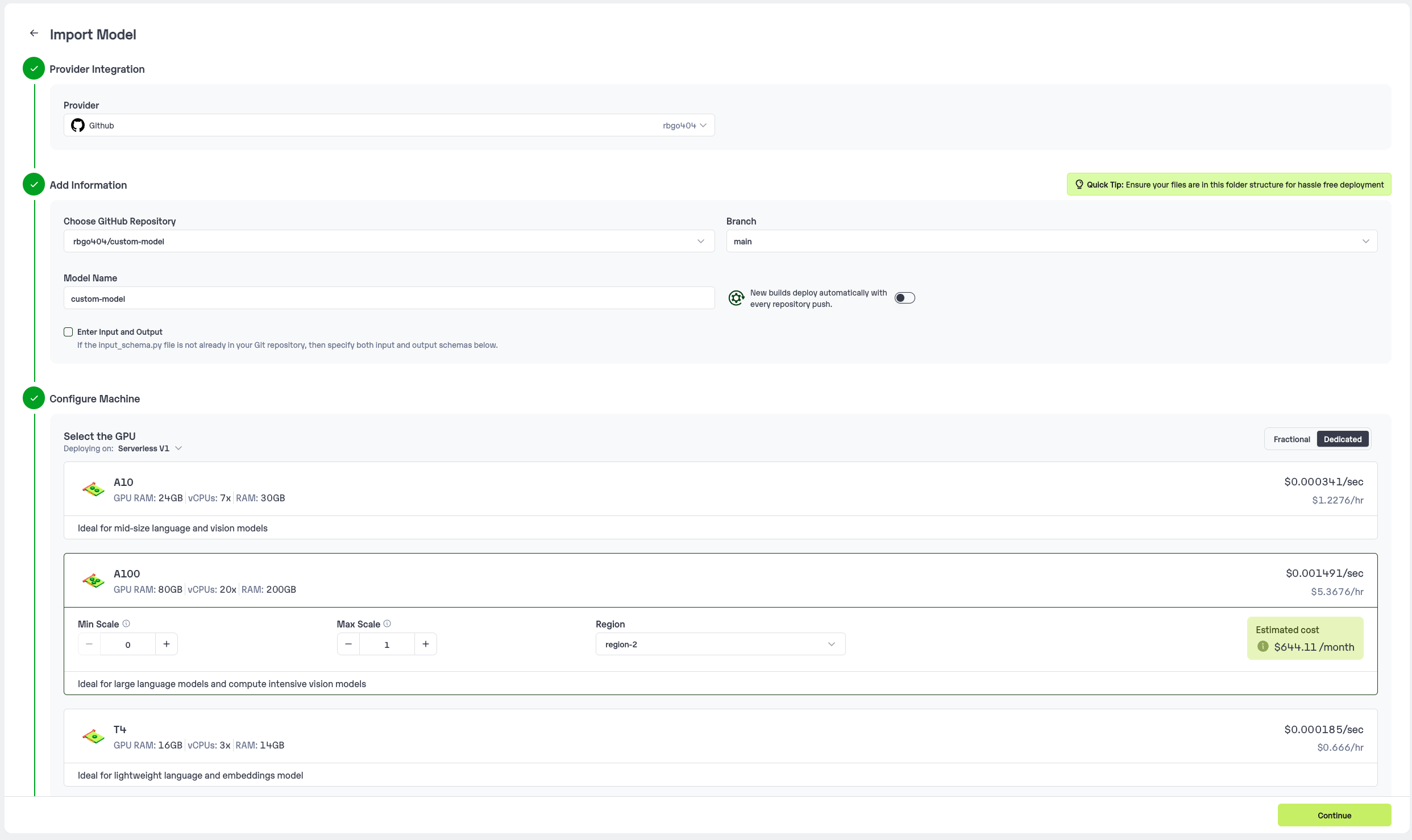
### Step 2: Follow the UI to complete the model Import
* Select the GitHub/GitLab Integration option to connect your source code repository with the deployment environment.
* Navigate to the specific GitHub repository that contains your model's code. Here, you will need to identify and enter the name of the model you wish to import.
* Choose the appropriate type of machine that suits your model's requirements. Additionally, specify the minimum and maximum number of replicas to define the scalability range for deploying your model.
* Optionally, you have the option to enable automatic build and deployment. This feature triggers a new deployment automatically whenever there is a new code push to your repository.
* If your model requires additional software packages, configure the Custom Runtime settings by including necessary pip or apt packages. Also, set up environment variables such as Inference Timeout, Container Concurrency, and Scale Down Timeout to tailor the runtime environment according to your needs.
* Wait for the validation process to complete, ensuring that all settings are correct and functional. Once validation is successful, click on the "Import" button to finalize the import of your model.
. Watermarks should be wrapped in brackets. Ex: OFFICIAL COPY. Page numbers should be wrapped in brackets. Ex: 14 or 9/22. Prefer using ☐ and ☑ for check boxes."""
```
You can pass the other input parameters in the same way (e.g., `--confidence_threshold`, etc.) as long as your code expects them in the `inputs` dictionary.
If you want to exclude certain files or directories from being uploaded, use the `--exclude` or `-e` flag.
## Method A: Deploying the model on Inferless Platform
Inferless supports multiple ways of [importing your model](https://docs.inferless.com/model-import/file-structure-req/file-structure-requirements). For this tutorial, we will use GitHub.
### Step 1: Login to the inferless dashboard can click on Import model button
Navigate to your desired workspace in Inferless and Click on `Add a custom model` button that you see on the top right. An import wizard will open up.
### Step 2: Follow the UI to complete the model Import
* Select the GitHub/GitLab Integration option to connect your source code repository with the deployment environment.
* Navigate to the specific GitHub repository that contains your model's code. Here, you will need to identify and enter the name of the model you wish to import.
* Choose the appropriate type of machine that suits your model's requirements. Additionally, specify the minimum and maximum number of replicas to define the scalability range for deploying your model.
* Optionally, you have the option to enable automatic build and deployment. This feature triggers a new deployment automatically whenever there is a new code push to your repository.
* If your model requires additional software packages, configure the Custom Runtime settings by including necessary pip or apt packages. Also, set up environment variables such as Inference Timeout, Container Concurrency, and Scale Down Timeout to tailor the runtime environment according to your needs.
* Wait for the validation process to complete, ensuring that all settings are correct and functional. Once validation is successful, click on the "Import" button to finalize the import of your model.
 ### Step 3: Wait for the model build to complete usually takes \~5-10 minutes
### Step 4: Use the APIs to call the model
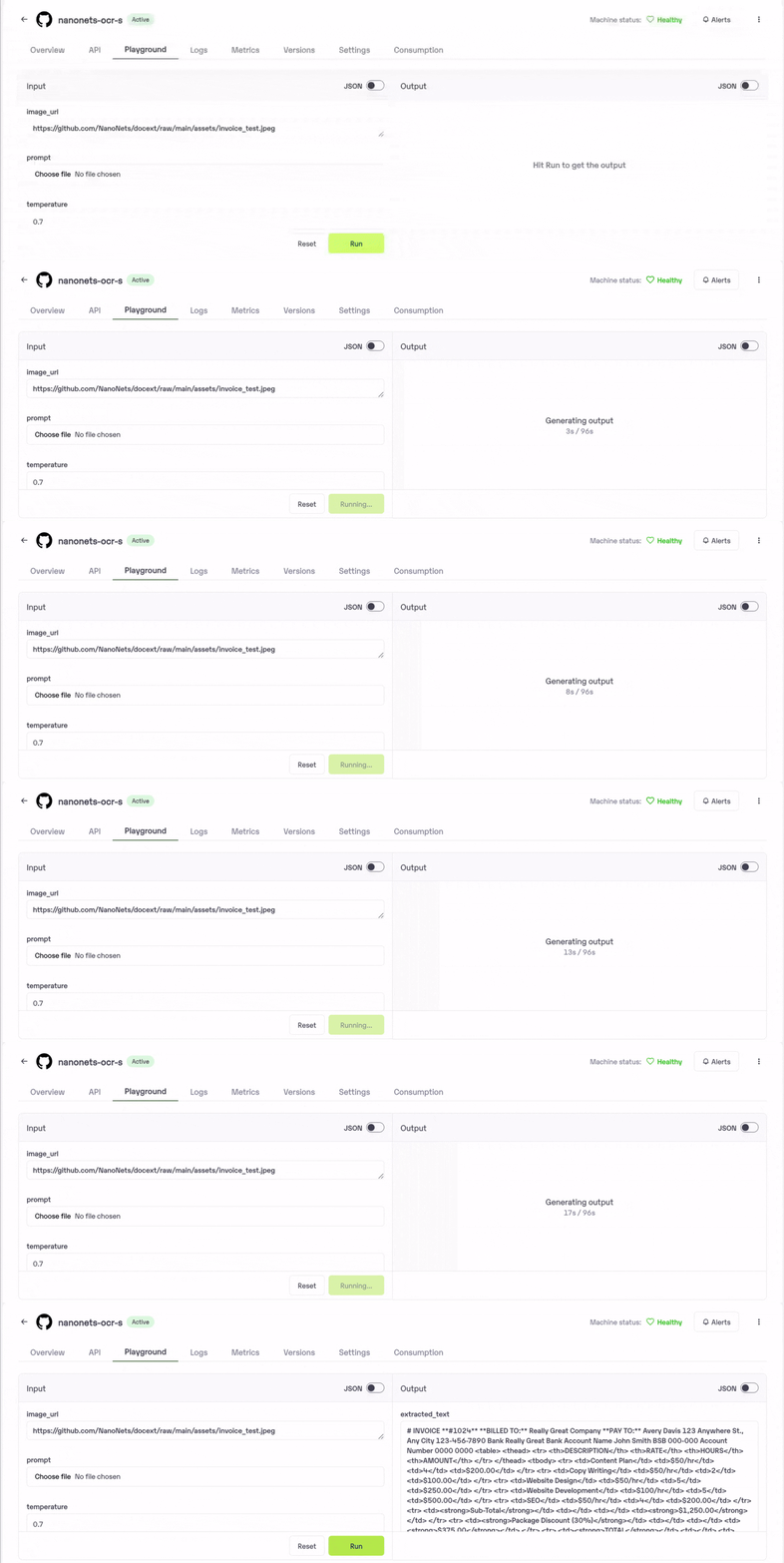
Once the model is in 'Active' status you can click on the 'API' page to call the model
### Here is the Demo:
### Step 3: Wait for the model build to complete usually takes \~5-10 minutes
### Step 4: Use the APIs to call the model
Once the model is in 'Active' status you can click on the 'API' page to call the model
### Here is the Demo:
 ## Method B: Deploying the model on Inferless CLI
Inferless allows you to deploy your model using Inferless-CLI. Follow the steps to deploy using Inferless CLI.
### Clone the repository of the model
Let's begin by cloning the model repository:
```bash theme={null}
git clone https://github.com/inferless/nanonets-ocr-s.git
```
### Deploy the Model
To deploy the model using Inferless CLI, execute the following command:
```bash theme={null}
inferless deploy --gpu A10 --runtime inferless-runtime-config.yaml
```
**Explanation of the Command:**
* `--gpu A10`: Specifies the GPU type for deployment. Available options include `A10`, `A100`, and `T4`.
* `--runtime inferless-runtime-config.yaml`: Defines the runtime configuration file. If not specified, the default Inferless runtime is used.
## Method B: Deploying the model on Inferless CLI
Inferless allows you to deploy your model using Inferless-CLI. Follow the steps to deploy using Inferless CLI.
### Clone the repository of the model
Let's begin by cloning the model repository:
```bash theme={null}
git clone https://github.com/inferless/nanonets-ocr-s.git
```
### Deploy the Model
To deploy the model using Inferless CLI, execute the following command:
```bash theme={null}
inferless deploy --gpu A10 --runtime inferless-runtime-config.yaml
```
**Explanation of the Command:**
* `--gpu A10`: Specifies the GPU type for deployment. Available options include `A10`, `A100`, and `T4`.
* `--runtime inferless-runtime-config.yaml`: Defines the runtime configuration file. If not specified, the default Inferless runtime is used.