> ## Documentation Index
> Fetch the complete documentation index at: https://docs.inferless.com/llms.txt
> Use this file to discover all available pages before exploring further.
# Build a Serverless YouTube Video Summarizer
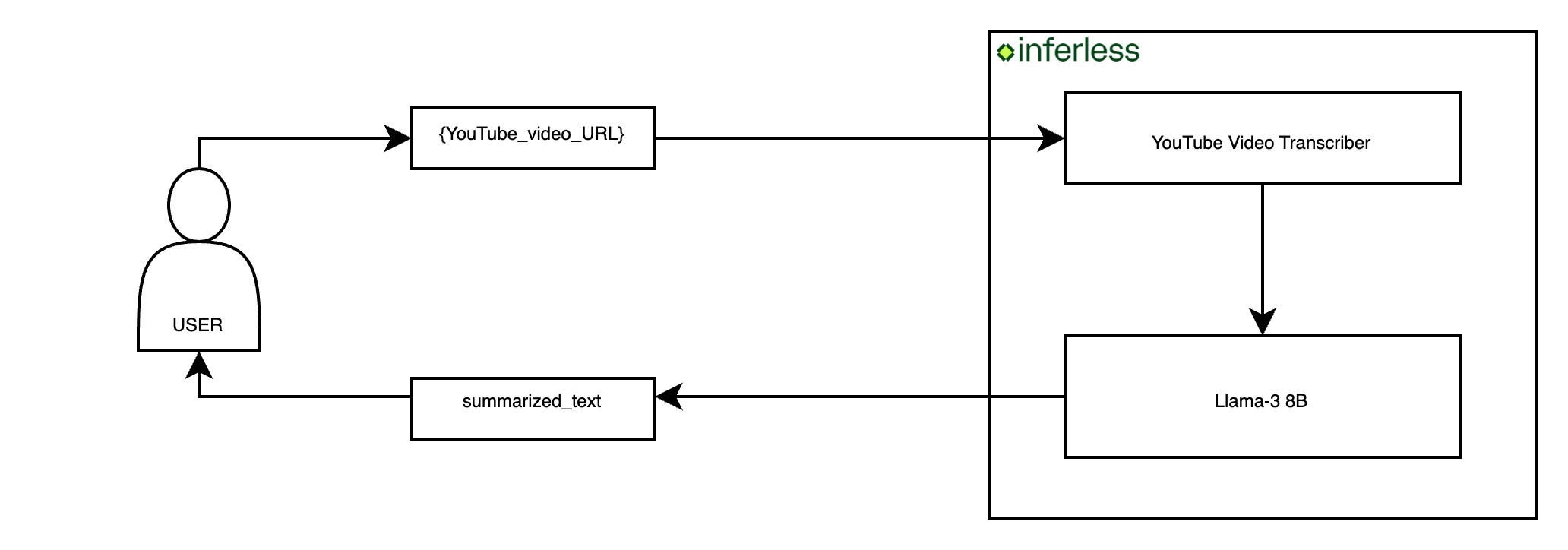
> This tutorial will walk you through creating a YouTube video summarizer application using Inferless Serverless Infrastructure. You'll learn how to extract summaries from YouTube URLs by harnessing the power of the Llama-3 8B model.
## Key Components of the Application
To build this application we will use these components:
1. **YouTube Video Transcriber:** This is required as to get the transcription of a given YouTube video. We will use [youtube-transcript-api](https://github.com/jdepoix/youtube-transcript-api).
2. **Text Summarization Model:** This model will summarize the transcribe text from the vidoe. We will use a fine-tuned [Llama-3 8B model](https://huggingface.co/NousResearch/Hermes-2-Pro-Llama-3-8B).
## Crafting Your Application
This tutorial guides you through the creation process of a [YouTube video summarizer application](https://github.com/inferless/YouTube-Video-Summarizer).
## Core Development Steps
* **Objective:** Accept the YouTube video url as a input and generate a summary.
* **Action:** Implement a Python class ([InferlessPythonModel](https://github.com/inferless/YouTube-Video-Summarizer/blob/main/app.py)) that handles the entire process, including input handling, transcription, and summary generation.
```python theme={null}
from youtube_transcript_api import YouTubeTranscriptApi
from vllm import LLM, SamplingParams
from transformers import AutoTokenizer
class InferlessPythonModel:
def initialize(self):
model_id = "NousResearch/Hermes-2-Pro-Llama-3-8B"
self.sampling_params = SamplingParams(temperature=0.7, top_p=0.95, max_tokens=1024)
self.llm = LLM(model=model_id)
self.tokenizer = AutoTokenizer.from_pretrained(model_id)
def get_transcription(self,youtube_url):
video_id = youtube_url.split("=")[1]
transcript_text=YouTubeTranscriptApi.get_transcript(video_id)
transcript = ""
for i in transcript_text:
transcript += " " + i["text"]
return transcript
def format_template(self,transcript):
messages = [
{
"role": "system",
"content":
"""You are a Senior NYT Reporter tasked with summarizing a youtube video.
"You will be provided with a youtube video transcript.",
"Carefully read the transcript a prepare thorough report of key facts and details.",
"Provide as many details and facts as possible in the summary.",
"Your report will be used to generate a final New York Times worthy report.",
"Give the section relevant titles and provide details/facts/processes in each section."
"REMEMBER: you are writing for the New York Times, so the quality of the report is important.",
"Make sure your report is properly formatted and follows the provided below.
### Overview
{give an overview of the video}
### Section 1
{provide details/facts/processes in this section}
... more sections as necessary...
### Takeaways
{provide key takeaways from the video}
"""
},
{"role": "user", "content":transcript}]
return messages
def infer(self, inputs):
youtube_url = inputs["youtube_url"]
transcript = self.get_transcription(youtube_url)
trimmed_text = self.tokenizer.decode((self.tokenizer.encode(transcript)[:7900]),skip_special_tokens=True)
format_text = self.format_template(trimmed_text)
text = self.tokenizer.apply_chat_template(format_text,tokenize=False,add_generation_prompt=True)
result = self.llm.generate(text, self.sampling_params)
result_output = [output.outputs[0].text for output in result]
return {"generated_summary": result_output[0]}
def finalize(self):
self.llm = None
self.tokenizer = None
```
### Setting up the Environment
**Dependencies:**
* **Objective:** Ensure all necessary libraries are installed.
* **Action:** Run the command below to install dependencies:
```bash theme={null}
pip install youtube-transcript-api==0.6.2 transformers==4.40.1 torch==2.2.1 xformers==0.0.25 vllm==0.4.1
```
This command ensures your environment has all the tools required for the application.
### Deploying Your Model with Inferless CLI
Inferless allows you to deploy your model using Inferless-CLI. Follow the steps to deploy using Inferless CLI.
#### Clone the repository of the model
Let's begin by cloning the model repository:
```bash theme={null}
git clone https://github.com/inferless/YouTube-Video-Summarizer.git
```
#### Deploy the Model
To deploy the model using Inferless CLI, execute the following command:
```bash theme={null}
inferless deploy --gpu A100 --runtime inferless-runtime-config.yaml
```
**Explanation of the Command:**
* `--gpu A100`: Specifies the GPU type for deployment. Available options include `A10`, `A100`, and `T4`.
* `--runtime inferless-runtime-config.yaml`: Defines the runtime configuration file. If not specified, the default Inferless runtime is used.
### Demo of the YouTube Video Summarizer.
### Alternative Deployment Method
Inferless also supports a user-friendly UI for model deployment, catering to users at all skill levels. Refer to Inferless's documentation for guidance on UI-based deployment.
## Choosing Inferless for Deployment
Deploying your YouTube Video Summarizer with Inferless offers compelling advantages, making your development journey smoother and more cost-effective. Here's why Inferless is the go-to choice:
1. **Ease of Use:** Forget the complexities of infrastructure management. With Inferless, you simply bring your model, and within minutes, you have a working endpoint. Deployment is hassle-free, without the need for in-depth knowledge of scaling or infrastructure maintenance.
2. **Cold-start Times:** Inferless's unique load balancing ensures faster cold-starts. Expect around 13.42 seconds to process each queries, significantly faster than many traditional platforms.
3. **Cost Efficiency:** Inferless optimizes resource utilization, translating to lower operational costs. Here's a simplified cost comparison:
### Scenario 1
You are looking to deploy a YouTube Video Summarizer for processing 100 queries.
**Parameters:**
* **Total number of queries:** 100 daily.
* **Inference Time:** All models are hypothetically deployed on A100 80GB, taking 6.67 seconds of processing time and a cold start overhead of 13.42 seconds.
* **Scale Down Timeout:** Uniformly 60 seconds across all platforms, except Hugging Face, which requires a minimum of 15 minutes. This is assumed to happen 100 times a day.
**Key Computations:**
1. **Inference Duration:**
Processing 100 queries and each takes 6.67 seconds
Total: 100 x 6.67 = 667 seconds (or approximately 0.19 hours)
2. **Idle Timeout Duration:**
Post-processing idle time before scaling down: (60 seconds - 6.67 seconds) x 100 = 5333 seconds (or 1.48 hours approximately)
3. **Cold Start Overhead:**
Total: 100 x 13.42 = 1342 seconds (or 0.37 hours approximately)
**Total Billable Hours with Inferless:** 0.19 (inference duration) + 1.48 (idle time) + 0.37 (cold start overhead) = 2.04 hours
**Total Billable Hours with Inferless:** 2.04 hours
### Scenario 2
You are looking to deploy a YouTube Video Summarizer for processing 1000 queries per day.
**Key Computations:**
1. **Inference Duration:**
Processing 1000 queries and each takes 6.67 seconds
Total: 1000 x 6.67 = 6670 seconds (or approximately 1.85 hours)
2. **Idle Timeout Duration:**
Post-processing idle time before scaling down: (60 seconds - 6.67 seconds) x 100 = 5333 seconds (or 1.48 hours approximately)
3. **Cold Start Overhead:**
Total: 100 x 13.42 = 1342 seconds (or 0.37 hours approximately)
**Total Billable Hours with Inferless:** 1.85 (inference duration) + 1.48 (idle time) + 0.37 (cold start overhead) = 3.7 hours
**Total Billable Hours with Inferless:** 3.7 hours
### Pricing Comparison for all the Scenario
| Scenarios | On-Demand Cost | Serverless Cost |
| :---------------- | :-------------------------------------- | :---------------------------------------- |
| 100 requests/day | \$28.8 (24 hours billed at \$1.22/hour) | \$2.49 (2.04 hours billed at \$1.22/hour) |
| 1000 requests/day | \$28.8 (24 hours billed at \$1.22/hour) | \$4.51 (3.7 hours billed at \$1.22/hour) |
By opting for Inferless, ***you can achieve up to 91.35% cost savings.***
Please note that we have utilized the A100(80 GB) GPU for model benchmarking purposes, while for pricing comparison, we referenced the A10G GPU price from both platforms. This is due to the unavailability of the A100 GPU in SageMaker.
Also, the above analysis is based on a smaller-scale scenario for demonstration purposes. Should the scale increase tenfold, traditional cloud services might require maintaining 2-4 GPUs constantly active to manage peak loads efficiently. In contrast, Inferless, with its dynamic scaling capabilities, adeptly adjusts to fluctuating demand without the need for continuously running hardware.
## Conclusion
By following this guide, you're now equipped to build and deploy a sophisticated YouTube Video Summarizer. This tutorial showcases the seamless integration of advanced technologies, emphasizing the practical application of creating cost-effective solutions.
 ## Core Development Steps
* **Objective:** Accept the YouTube video url as a input and generate a summary.
* **Action:** Implement a Python class ([InferlessPythonModel](https://github.com/inferless/YouTube-Video-Summarizer/blob/main/app.py)) that handles the entire process, including input handling, transcription, and summary generation.
```python theme={null}
from youtube_transcript_api import YouTubeTranscriptApi
from vllm import LLM, SamplingParams
from transformers import AutoTokenizer
class InferlessPythonModel:
def initialize(self):
model_id = "NousResearch/Hermes-2-Pro-Llama-3-8B"
self.sampling_params = SamplingParams(temperature=0.7, top_p=0.95, max_tokens=1024)
self.llm = LLM(model=model_id)
self.tokenizer = AutoTokenizer.from_pretrained(model_id)
def get_transcription(self,youtube_url):
video_id = youtube_url.split("=")[1]
transcript_text=YouTubeTranscriptApi.get_transcript(video_id)
transcript = ""
for i in transcript_text:
transcript += " " + i["text"]
return transcript
def format_template(self,transcript):
messages = [
{
"role": "system",
"content":
"""You are a Senior NYT Reporter tasked with summarizing a youtube video.
"You will be provided with a youtube video transcript.",
"Carefully read the transcript a prepare thorough report of key facts and details.",
"Provide as many details and facts as possible in the summary.",
"Your report will be used to generate a final New York Times worthy report.",
"Give the section relevant titles and provide details/facts/processes in each section."
"REMEMBER: you are writing for the New York Times, so the quality of the report is important.",
"Make sure your report is properly formatted and follows the
## Core Development Steps
* **Objective:** Accept the YouTube video url as a input and generate a summary.
* **Action:** Implement a Python class ([InferlessPythonModel](https://github.com/inferless/YouTube-Video-Summarizer/blob/main/app.py)) that handles the entire process, including input handling, transcription, and summary generation.
```python theme={null}
from youtube_transcript_api import YouTubeTranscriptApi
from vllm import LLM, SamplingParams
from transformers import AutoTokenizer
class InferlessPythonModel:
def initialize(self):
model_id = "NousResearch/Hermes-2-Pro-Llama-3-8B"
self.sampling_params = SamplingParams(temperature=0.7, top_p=0.95, max_tokens=1024)
self.llm = LLM(model=model_id)
self.tokenizer = AutoTokenizer.from_pretrained(model_id)
def get_transcription(self,youtube_url):
video_id = youtube_url.split("=")[1]
transcript_text=YouTubeTranscriptApi.get_transcript(video_id)
transcript = ""
for i in transcript_text:
transcript += " " + i["text"]
return transcript
def format_template(self,transcript):
messages = [
{
"role": "system",
"content":
"""You are a Senior NYT Reporter tasked with summarizing a youtube video.
"You will be provided with a youtube video transcript.",
"Carefully read the transcript a prepare thorough report of key facts and details.",
"Provide as many details and facts as possible in the summary.",
"Your report will be used to generate a final New York Times worthy report.",
"Give the section relevant titles and provide details/facts/processes in each section."
"REMEMBER: you are writing for the New York Times, so the quality of the report is important.",
"Make sure your report is properly formatted and follows the