> ## Documentation Index
> Fetch the complete documentation index at: https://docs.inferless.com/llms.txt
> Use this file to discover all available pages before exploring further.
# Deploy and Run ComfyUI as an API on Inferless
> Welcome to an immersive tutorial that guides you through leveraging the power of ComfyUI's API capabilities and deploying your workflows on Inferless. This resource is designed to help you create and deploy custom workflows, extending ComfyUI's API functionality. You'll learn how to interact with ComfyUI and deploy on Inferless.
## Introduction
ComfyUI is an open-source graphical user interface for image-generation models, used for generating images from text prompts using node-based approach. It allows users to create complex image generation workflows and offers extensive customization options, making it a powerful tool for AI-driven creativity.
In this tutorial we will show you how you can use your custom workflow with the ComfyUI API on Inferless.
## Overview of the Solution
Our solution revolves around these key files that works together to set up and run ComfyUI on Inferless, alongside an NFS (Network File System) volume for persistent storage.
1. [`build.sh`](https://github.com/inferless/ComfyUI-Inferless-template/blob/main/build.sh): This shell script automates the setup of the ComfyUI environment on the NFS volume. It leverages the ComfyUI command-line interface (CLI) to install and configure ComfyUI, ensuring the necessary model weights are downloaded into the specified workspace directory.
```bash theme={null}
comfy --skip-prompt --workspace=$NFS_VOLUME/ComfyUI install --nvidia
comfy --skip-prompt model download --url https://huggingface.co/black-forest-labs/FLUX.1-dev/resolve/main/flux1-dev.safetensors --relative-path models/unet --set-civitai-api-token $HF_ACCESS_TOKEN
comfy --skip-prompt model download --url https://huggingface.co/comfyanonymous/flux_text_encoders/resolve/main/t5xxl_fp16.safetensors --relative-path models/clip
comfy --skip-prompt model download --url https://huggingface.co/comfyanonymous/flux_text_encoders/resolve/main/clip_l.safetensors --relative-path models/clip
comfy --skip-prompt model download --url https://huggingface.co/comfyanonymous/flux_text_encoders/resolve/main/t5xxl_fp8_e4m3fn.safetensors --relative-path models/clip
comfy --skip-prompt model download --url https://huggingface.co/black-forest-labs/FLUX.1-schnell/resolve/main/ae.safetensors --relative-path models/vae
comfy --skip-prompt model download --url https://huggingface.co/autismanon/modeldump/resolve/main/dreamshaper_8.safetensors --relative-path models/checkpoints
mkdir -p "$NFS_VOLUME/workflows"
```
2. [`app.py`](https://github.com/inferless/ComfyUI-Inferless-template/blob/main/app.py): This Python script contains the `InferlessPythonModel` class, which Inferless uses to manage the application lifecycle.
* The `initialize` function within this class triggers the `build.sh` script to set up the environment.
* The `infer` function is responsible for processing incoming user requests by interacting with the ComfyUI server to generate images, which it then returns to the user. Additionally, this function handles loading user workflows, updating them with user prompts, and managing the lifecycle of the ComfyUI server.
```python theme={null}
import subprocess
import os
import uuid
from comfy_utils import run_comfyui_in_background, check_comfyui, load_workflow, prompt_update_workflow, send_comfyui_request, get_img_file_path, image_to_base64, stop_server_on_port, is_comfyui_running
import requests
import json
class InferlessPythonModel:
def initialize(self):
self.directory_path = os.getenv('NFS_VOLUME')
if not os.path.exists(self.directory_path+"/ComfyUI"):
subprocess.run(["wget", "https://github.com/inferless/ComfyUI-Inferless-template/raw/main/build.sh"])
subprocess.run(["bash", "build.sh"], check=True)
self._data_dir = self.directory_path+"/workflows"
self.server_address = "127.0.0.1:8188"
self.client_id = str(uuid.uuid4())
if is_comfyui_running(self.server_address):
stop_server_on_port(8188)
run_comfyui_in_background(self.directory_path+'/ComfyUI')
self.ws = check_comfyui(self.server_address,self.client_id)
def infer(self, inputs):
workflow_input = inputs.get("workflow")
prompt = inputs.get("prompt")
negative_prompt = inputs.get("negative_prompt")
workflow_filename = "workflow_api.json"
workflow_path = os.path.join(self._data_dir, workflow_filename)
# Process the workflow input
if workflow_input.startswith('http://') or workflow_input.startswith('https://'):
response = requests.get(workflow_input)
workflow_json = response.json()
else:
workflow_json = json.loads(workflow_input)
# Save the workflow JSON to a file
with open(workflow_path, 'w') as f:
json.dump(workflow_json, f)
# Load the saved workflow
workflow = load_workflow(workflow_path)
prompt = prompt_update_workflow(workflow_filename, workflow, prompt)
prompt_id = send_comfyui_request(self.ws, prompt, self.server_address, self.client_id)
file_path = get_img_file_path(self.server_address, prompt_id)
image_base64 = image_to_base64(self.directory_path+"/ComfyUI"+file_path)
return {"generated_image_base64": image_base64}
def finalize(self):
pass
```
3. [`comfy_utils.py`](https://github.com/inferless/ComfyUI-Inferless-template/blob/main/comfy_utils.py): This utility script have helper functions that streamline our interaction with ComfyUI.
```python theme={null}
import json
import urllib.request
import time
import subprocess
import os
import websocket
import threading
import sys
import base64
import requests
import psutil
def start_comfyui(comfyui_path):
try:
process = subprocess.Popen(f"comfy --skip-prompt --workspace={comfyui_path} launch -- --listen 127.0.0.1 --port 8188",shell=True)
# Wait for a short time to see if the process starts successfully
time.sleep(5)
if process.poll() is None:
return process
else:
stdout, stderr = process.communicate()
raise Exception("ComfyUI server failed to start")
except Exception as e:
raise Exception("Error setting up ComfyUI repo") from e
def run_comfyui_in_background(comfyui_path):
def run_server():
process = start_comfyui(comfyui_path)
if process:
stdout, stderr = process.communicate()
server_thread = threading.Thread(target=run_server)
server_thread.start()
def check_comfyui(server_address,client_id):
socket_connected = False
while not socket_connected:
try:
ws = websocket.WebSocket()
ws.connect(
"ws://{}/ws?clientId={}".format(server_address, client_id)
)
socket_connected = True
except Exception as e:
time.sleep(5)
return ws
def load_workflow(workflow_path):
with open(f"{workflow_path}", 'rb') as file:
return json.load(file)
def prompt_update_workflow(workflow_name,workflow,prompt,negative_prompt=None):
workflow["6"]["inputs"]["text"] = prompt
if negative_prompt:
workflow["7"]["inputs"]["text"] = negative_prompt
return workflow
def send_comfyui_request(ws, prompt, server_address,client_id):
p = {"prompt": prompt,"client_id": client_id}
data = json.dumps(p).encode("utf-8")
url = f"http://{server_address}/prompt"
req = urllib.request.Request(url, data=data, headers={'Content-Type': 'application/json'})
with urllib.request.urlopen(req, timeout=10) as response:
response = json.loads(response.read())
while True:
prompt_id = response["prompt_id"]
out = ws.recv()
if isinstance(out, str):
message = json.loads(out)
if message["type"] == "executing":
data = message["data"]
if data["node"] is None and data["prompt_id"] == prompt_id:
break
else:
continue
return prompt_id
def get_img_file_path(server_address,prompt_id):
with urllib.request.urlopen(
"http://{}/history/{}".format(server_address, prompt_id),timeout=10
) as response:
output = json.loads(response.read())
outputs = output[prompt_id]["outputs"]
for node_id in outputs:
node_output = outputs[node_id]
if "images" in node_output:
image_outputs = []
for image in node_output["images"]:
image_outputs.append({"filename": image.get("filename")})
for node_id in image_outputs:
file_path = f"/output/{node_id.get('filename')}"
return file_path
def image_to_base64(image_path):
with open(image_path, "rb") as image_file:
encoded_string = base64.b64encode(image_file.read())
return encoded_string.decode('utf-8')
def stop_server_on_port(port):
for connection in psutil.net_connections():
if connection.laddr.port == port:
process = psutil.Process(connection.pid)
process.terminate()
def is_comfyui_running(server_address="127.0.0.1:8188"):
try:
response = requests.get(f"http://{server_address}/", timeout=5)
return response.status_code == 200
except requests.RequestException:
return False
```
4. [`inferless-runtime-config.yaml`](https://github.com/inferless/ComfyUI-Inferless-template/blob/main/inferless-runtime-config.yaml) : This YAML file is crucial for configuring the runtime environment for our ComfyUI application on Inferless.
```python theme={null}
build:
system_packages:
- "wget"
- "ffmpeg"
- "libgl1-mesa-glx"
python_packages:
- "comfy-cli==1.2.3"
- "websocket-client==1.6.4"
- "accelerate==0.23.0"
- "opencv-python==4.10.0.84"
- "boto3==1.35.9"
- "pillow==10.4.0"
- "torchvision==0.19.0"
- "einops==0.8.0"
- "transformers==4.44.2"
- "scipy==1.14.1"
- "torchsde==0.2.6"
- "aiohttp==3.10.5"
- "safetensors==0.4.4"
- "pydantic==2.8.2"
- "groq==0.10.0"
- "aiohttp-sse==2.2.0"
- "spandrel==0.3.4"
- "kornia==0.7.3"
- "torchaudio==2.4.0"
- "matplotlib==3.8.0"
- "scikit-image==0.24.0"
- "simpleeval==0.9.13"
- "imageio-ffmpeg==0.5.1"
- "pypng==0.20220715.0"
```
## Architecture overview
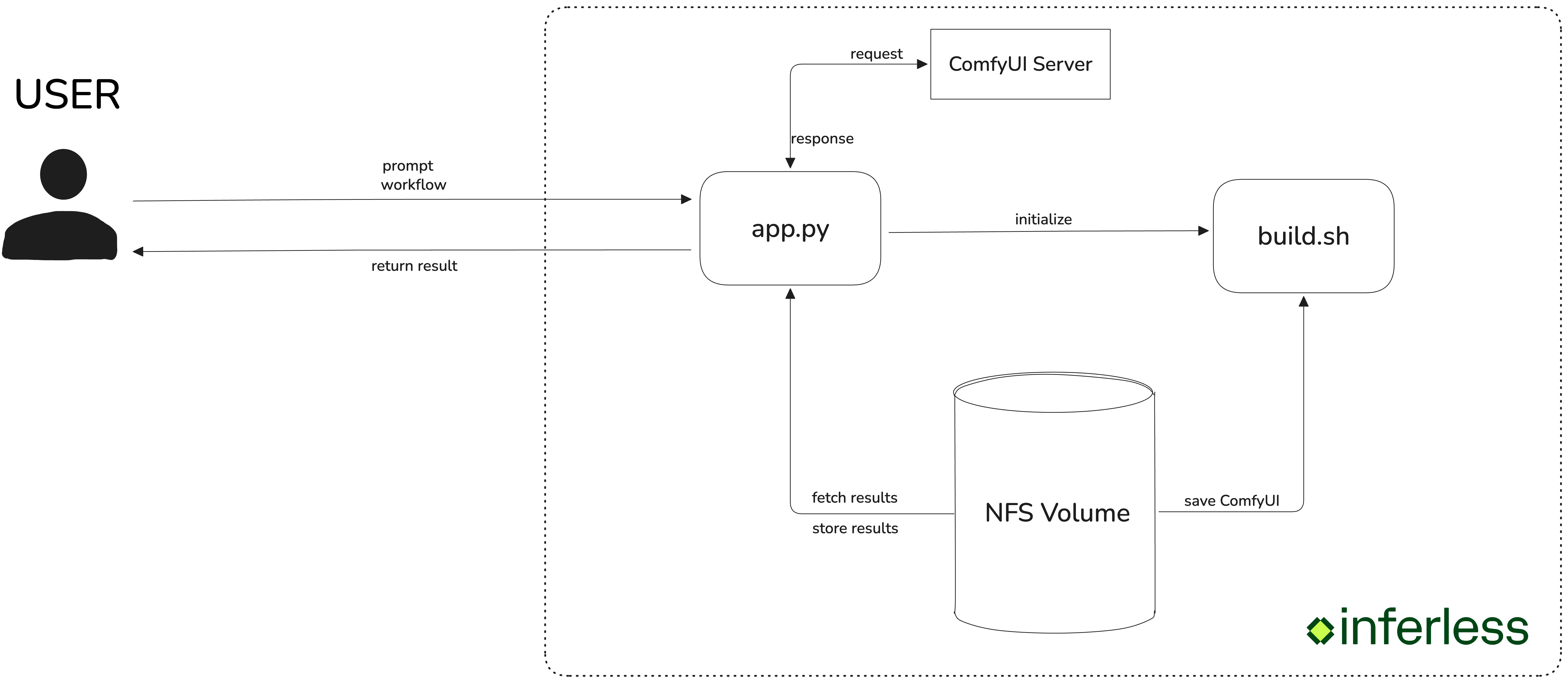 Our solution utilizes a streamlined request-response model consisting of the following steps:
1. User Request: Users submit requests to the Inferless endpoint, specifying both the desired workflow and a prompt. Inferless then directs these requests to our ComfyUI server.
2. ComfyUI Processing: Upon receiving the request, the specified workflow is executed by the ComfyUI server, which processes the prompt to generate the image. Once the image is ready, we retrieve the result.
3. Response Delivery: The generated image is encoded in base64 format and returned to the user.
## Deploy your ComfyUI application
Deploying your ComfyUI application on Inferless involves a series of straightforward steps that leverage the platform's serverless capabilities. Here's the steps for deployment:
1. Begin by creating an NFS volume on Inferless. This volume will serve as the persistent storage for your ComfyUI files, workflows, and generated images. Note the mount path (e.g., `/var/nfs-mount/YOUR_VOLUME_MOUNT_PATH`) as you'll need to pass as an environment variable as `NFS_VOLUME`.
2. Ensure your `build.sh`, `app.py`, `comfy_utils.py`, and any custom workflow JSON files are ready. These files should be uploaded to a GitHub repository for easy access during deployment.
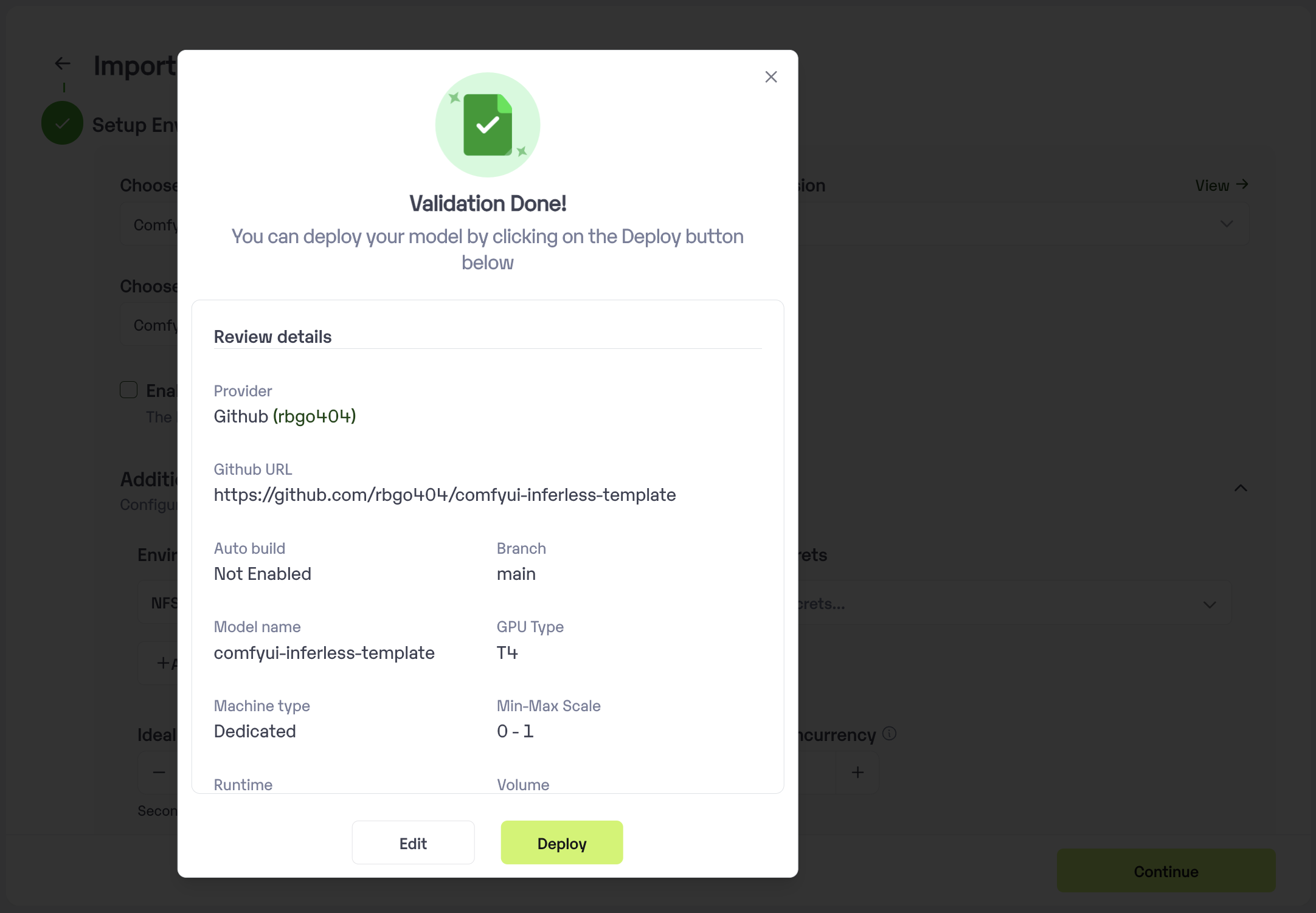
3. Log into your Inferless account and click on the `Add a custom model`. Then follow these steps:
* Select the Github from the model provider list and then select the GitHub repository URL and branch.
Our solution utilizes a streamlined request-response model consisting of the following steps:
1. User Request: Users submit requests to the Inferless endpoint, specifying both the desired workflow and a prompt. Inferless then directs these requests to our ComfyUI server.
2. ComfyUI Processing: Upon receiving the request, the specified workflow is executed by the ComfyUI server, which processes the prompt to generate the image. Once the image is ready, we retrieve the result.
3. Response Delivery: The generated image is encoded in base64 format and returned to the user.
## Deploy your ComfyUI application
Deploying your ComfyUI application on Inferless involves a series of straightforward steps that leverage the platform's serverless capabilities. Here's the steps for deployment:
1. Begin by creating an NFS volume on Inferless. This volume will serve as the persistent storage for your ComfyUI files, workflows, and generated images. Note the mount path (e.g., `/var/nfs-mount/YOUR_VOLUME_MOUNT_PATH`) as you'll need to pass as an environment variable as `NFS_VOLUME`.
2. Ensure your `build.sh`, `app.py`, `comfy_utils.py`, and any custom workflow JSON files are ready. These files should be uploaded to a GitHub repository for easy access during deployment.
3. Log into your Inferless account and click on the `Add a custom model`. Then follow these steps:
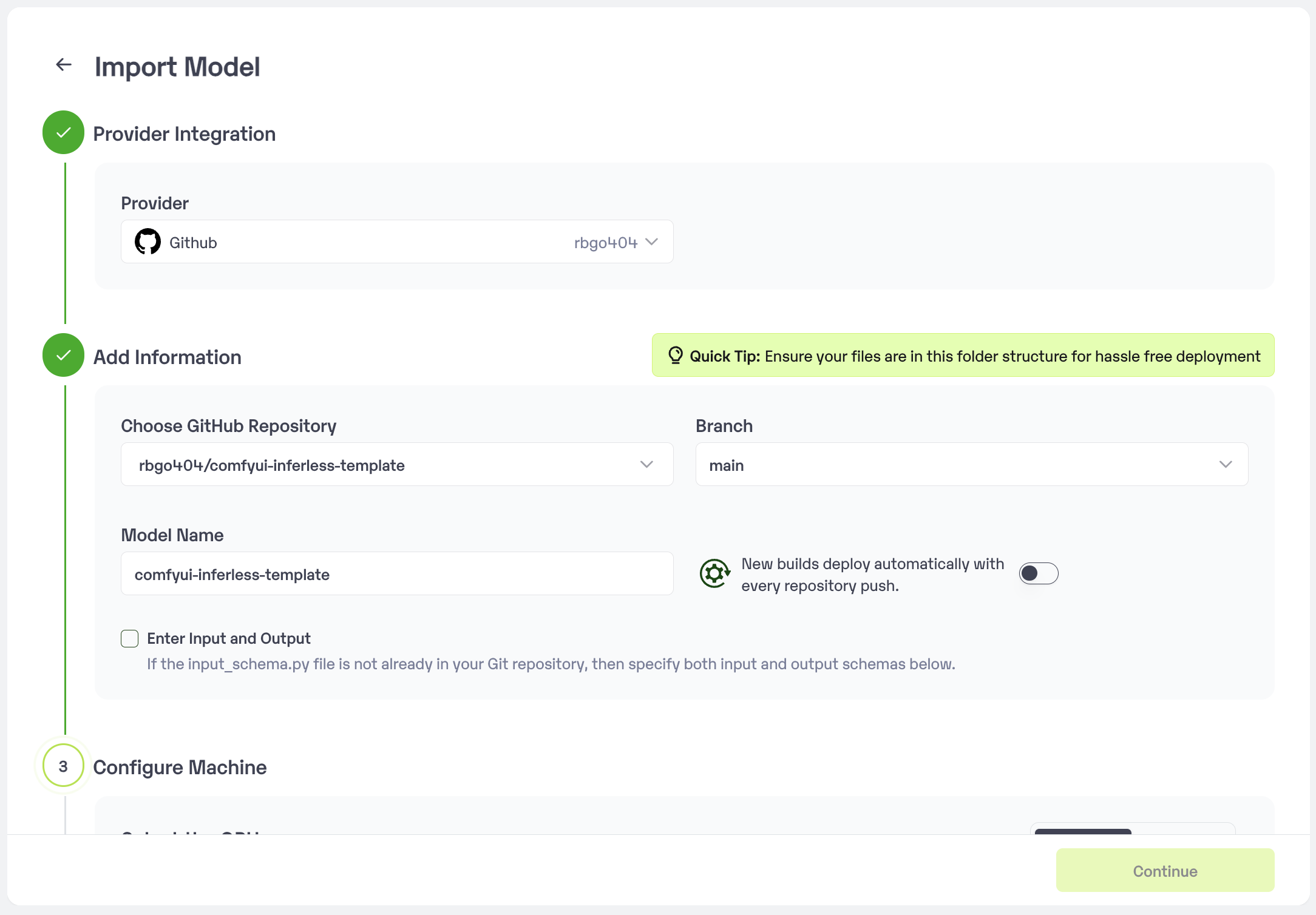
* Select the Github from the model provider list and then select the GitHub repository URL and branch.
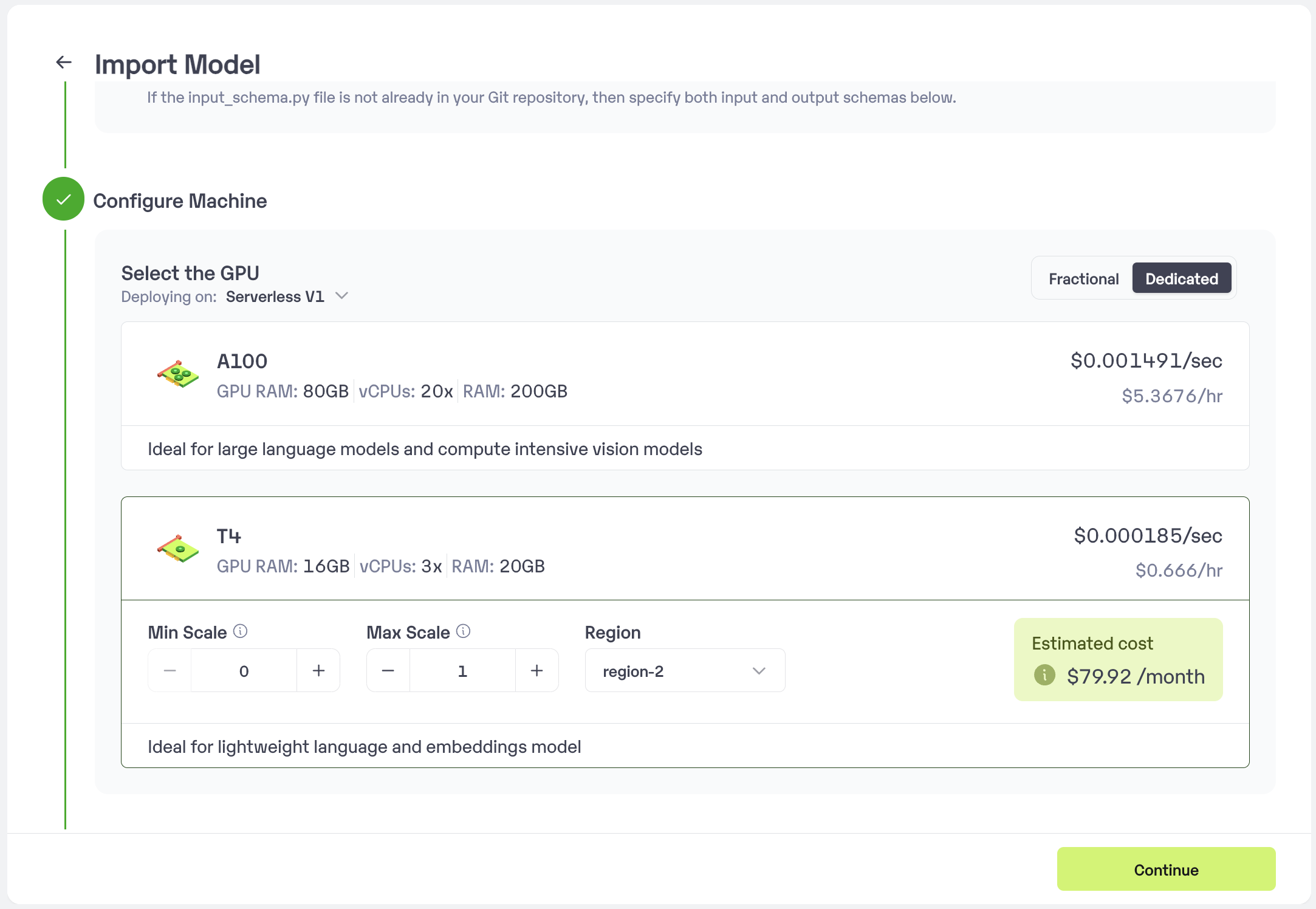
 * Choose the type of machine, and specify the minimum and maximum number of replicas for deploying your ComfyUI.
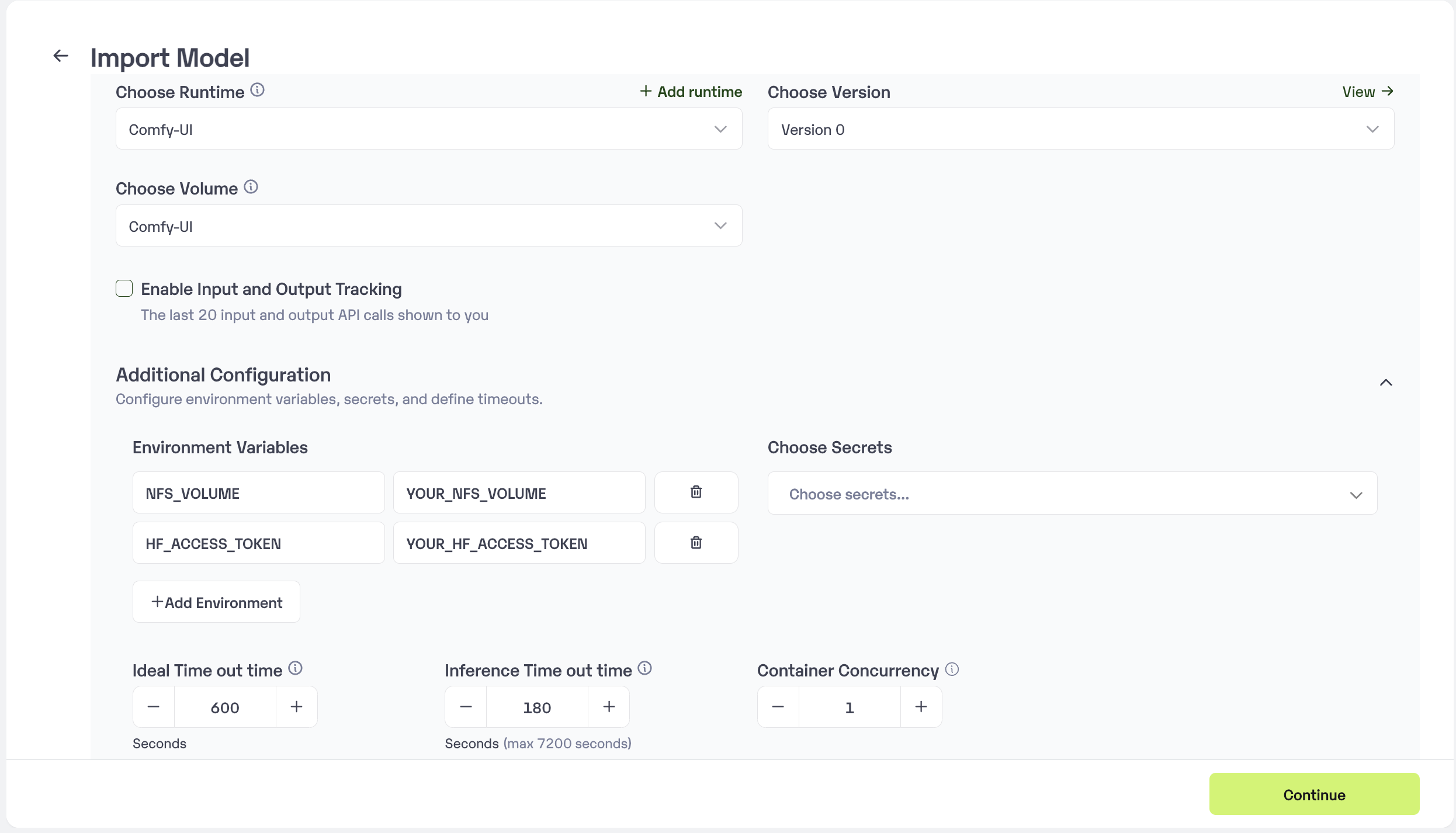
 * Upload the Custom Runtime and choose the NFS Volume that we have created. Secrets and set Environment variables like Inference Timeout, Container Concurrency, Scale Down Timeout.
* Now pass the NFS Volume path and Hugging Face access token as a environment variables `NFS_VOLUME` as key and YOUR\_VOLUME\_MOUNT\_PATH as the value. And then `HF_ACCESS_TOKEN` as key and YOUR\_HF\_ACCESS\_TOKEN as the value.
* Upload the Custom Runtime and choose the NFS Volume that we have created. Secrets and set Environment variables like Inference Timeout, Container Concurrency, Scale Down Timeout.
* Now pass the NFS Volume path and Hugging Face access token as a environment variables `NFS_VOLUME` as key and YOUR\_VOLUME\_MOUNT\_PATH as the value. And then `HF_ACCESS_TOKEN` as key and YOUR\_HF\_ACCESS\_TOKEN as the value.
 * Click on the deploy to start the deployment process.
 ## Deploying Your Model with Inferless CLI
Inferless allows you to deploy your model using Inferless-CLI. Follow the steps to deploy using Inferless CLI.
### Clone the repository of the model
Let's begin by cloning the model repository:
```bash theme={null}
git clone https://github.com/inferless/ComfyUI-Inferless-template.git
```
### Deploy the Model
To deploy the model using Inferless CLI, execute the following command:
```bash theme={null}
inferless deploy --gpu A100 --runtime inferless-runtime-config.yaml
```
**Explanation of the Command:**
* `--gpu A100`: Specifies the GPU type for deployment. Available options include `A10`, `A100`, and `T4`.
* `--runtime inferless-runtime-config.yaml`: Defines the runtime configuration file. If not specified, the default Inferless runtime is used.
## Adding your ComfyUI workflow with Example
Let's take **[ComfyUI workflow for Flux](https://openart.ai/workflows/maitruclam/comfyui-workflow-for-flux-simple/iuRdGnfzmTbOOzONIiVV)** as an example and import this workflow into Inferless.
1. First, download the `workflow.json` for the Flux workflow and convert it into a format compatible with the ComfyUI API.
2. Identifying Required Models:
For the Flux workflow, we need to download the FLUX model and any other model required for this workflow. We'll add this to our `build.sh` script. You can add any other models in similar way.
```bash theme={null}
comfy --skip-prompt model download --url https://huggingface.co/black-forest-labs/FLUX.1-dev/resolve/main/flux1-dev.safetensors --relative-path models/unet --set-civitai-api-token $HF_ACCESS_TOKEN
comfy --skip-prompt model download --url https://huggingface.co/comfyanonymous/flux_text_encoders/resolve/main/t5xxl_fp16.safetensors --relative-path models/clip
comfy --skip-prompt model download --url https://huggingface.co/comfyanonymous/flux_text_encoders/resolve/main/clip_l.safetensors --relative-path models/clip
comfy --skip-prompt model download --url https://huggingface.co/comfyanonymous/flux_text_encoders/resolve/main/t5xxl_fp8_e4m3fn.safetensors --relative-path models/clip
comfy --skip-prompt model download --url https://huggingface.co/black-forest-labs/FLUX.1-schnell/resolve/main/ae.safetensors --relative-path models/vae
```
3. Updating Input Schema:
If your Flux workflow requires additional user inputs, you will need to update the [`input_schema.py`](https://github.com/inferless/ComfyUI-Inferless-template/blob/main/input_schema.py) file accordingly. For instance, if your workflow requires both a prompt and a negative prompt, update the file to handle these inputs.
```python theme={null}
INPUT_SCHEMA = {
"prompt": {
'datatype': 'STRING',
'required': True,
'shape': [1],
'example': ["A cat holding a sign that says hello world"]
},
"negative_prompt": {
'datatype': 'STRING',
'required': True,
'shape': [1],
'example': ["low quality"]
}
}
```
## Running Comfy-UI on Inferless
Once your ComfyUI workflow is set up and deployed on Inferless, you can run it effortlessly through a simple API call.
1. API Endpoint: Inferless provides a unique URL for your deployed model, which will be used for making requests.
2. Authentication: Include an authorization token in the request headers. Inferless uses bearer token authentication for secure access.
3. Input Format: Format your input as a JSON object, specifying the parameters defined in your `input_schema.py`.
Here's a Python example of how to make a request to your deployed ComfyUI model on Inferless:
In this example:
```python theme={null}
import requests
import json
curl --location '' \
--header 'Content-Type: application/json' \
--header 'Authorization: Bearer ' \
URL = ''
headers = {"Content-Type": "application/json", "Authorization": "Bearer "}
data = {
"inputs": [
{
"name": "prompt",
"shape": [
1
],
"data": [
"A cat holding a sign that says hello world"
],
"datatype": "BYTES"
},
{
"name": "workflow",
"shape": [
1
],
"data": [
"https://github.com/inferless/ComfyUI-Inferless-template/raw/main/workflows/sd1-5_workflow.json"
],
"datatype": "BYTES"
},
{
"name": "negative_prompt",
"optional": true,
"shape": [
1
],
"data": [
"blurry, illustration, toy, clay, low quality, flag, nasa, mission patch"
],
"datatype": "BYTES"
}
]
}
response = requests.post(URL, headers=headers, data=json.dumps(data))
print(response.json())
```
## Choosing Inferless for Deployment
Deploying your ComfyUI application with Inferless offers compelling advantages, making your development journey smoother and more cost-effective. Here’s why Inferless is the go-to choice:
1. **Ease of Use:** Forget the complexities of infrastructure management. With Inferless, you simply bring your model, and within minutes, you have a working endpoint. Deployment is hassle-free, without the need for in-depth knowledge of scaling or infrastructure maintenance.
2. **Cold-start Times:** Inferless’s unique load balancing ensures faster cold-starts. Expect around `10.59` seconds to process each queries, significantly faster than many traditional platforms.
3. **Cost Efficiency:** Inferless optimizes resource utilization, translating to lower operational costs. Here’s a simplified cost comparison:
### Scenario 1
You are looking to deploy a ComfyUI application for processing 100 queries.
**Parameters:**
* **Total number of queries:** 100 daily.
* **Inference Time:** All models are hypothetically deployed on A100 80GB, taking
`10.59` seconds of processing time and a cold start overhead of `6.88` seconds.
* **Scale Down Timeout:** Uniformly 60 seconds across all platforms, except Hugging Face, which requires a minimum of 15 minutes. This is assumed to happen 100 times a day.
**Key Computations:**
1. **Inference Duration:**
Processing 100 queries and each takes 10.59 seconds
Total: 100 x 10.59 = 1059 seconds (or approximately 0.29 hours)
2. **Idle Timeout Duration:**
Post-processing idle time before scaling down: (60 seconds - 10.59 seconds) x 100 = 4941 seconds (or 1.37 hours approximately)
3. **Cold Start Overhead:**
Total: 100 x 6.88 = 688 seconds (or 0.19 hours approximately)
**Total Billable Hours with Inferless:** 0.29 (inference duration) + 1.37 (idle time) + 0.19 (cold start overhead) = 1.85 hours
**Total Billable Hours with Inferless:** `1.85` hours
### Scenario 2
You are looking to deploy a ComfyUI application for processing 1000 queries per day.
**Key Computations:**
1. **Inference Duration:**
Processing 1000 queries and each takes 10.59 seconds
Total: 1000 x 10.59 = 10590 seconds (or approximately 2.94 hours)
2. **Idle Timeout Duration:**
Post-processing idle time before scaling down: (60 seconds - 10.59 seconds) x 100 = 4941 seconds (or 1.37 hours approximately)
3. **Cold Start Overhead:**
Total: 100 x 6.88 = 688 seconds (or 0.19 hours approximately)
**Total Billable Hours with Inferless:** 2.94 (inference duration) + 1.37 (idle time) + 0.19 (cold start overhead) = 4.5 hours
**Total Billable Hours with Inferless:** `4.5` hours
### Pricing Comparison for all the Scenario
| **Scenarios** | **On-Demand Cost** | **Inferless Cost** |
| ----------------- | --------------------------------------- | ----------------------------------------- |
| 100 requests/day | \$28.8 (24 hours billed at \$1.22/hour) | \$2.26 (1.85 hours billed at \$1.22/hour) |
| 1000 requests/day | \$28.8 (24 hours billed at \$1.22/hour) | \$5.49 (4.5 hours billed at \$1.22/hour) |
By opting for Inferless, you can achieve up to ***80.94%*** cost savings.
Please note that we have utilized the A100(80 GB) GPU for model benchmarking purposes, while for pricing comparison, we referenced the A10G GPU price from both platforms. This is due to the unavailability of the A100 GPU in SageMaker.
Also, the above analysis is based on a smaller-scale scenario for demonstration purposes. Should the scale increase tenfold, traditional cloud services might require maintaining 2-4 GPUs constantly active to manage peak loads efficiently. In contrast, Inferless, with its dynamic scaling capabilities, adeptly adjusts to fluctuating demand without the need for continuously running hardware.
## Conclusion
By following this approach, you can easily integrate your ComfyUI workflows into other applications or scripts, leveraging the power of Inferless for efficient and scalable AI image generation.
## Deploying Your Model with Inferless CLI
Inferless allows you to deploy your model using Inferless-CLI. Follow the steps to deploy using Inferless CLI.
### Clone the repository of the model
Let's begin by cloning the model repository:
```bash theme={null}
git clone https://github.com/inferless/ComfyUI-Inferless-template.git
```
### Deploy the Model
To deploy the model using Inferless CLI, execute the following command:
```bash theme={null}
inferless deploy --gpu A100 --runtime inferless-runtime-config.yaml
```
**Explanation of the Command:**
* `--gpu A100`: Specifies the GPU type for deployment. Available options include `A10`, `A100`, and `T4`.
* `--runtime inferless-runtime-config.yaml`: Defines the runtime configuration file. If not specified, the default Inferless runtime is used.
## Adding your ComfyUI workflow with Example
Let's take **[ComfyUI workflow for Flux](https://openart.ai/workflows/maitruclam/comfyui-workflow-for-flux-simple/iuRdGnfzmTbOOzONIiVV)** as an example and import this workflow into Inferless.
1. First, download the `workflow.json` for the Flux workflow and convert it into a format compatible with the ComfyUI API.
2. Identifying Required Models:
For the Flux workflow, we need to download the FLUX model and any other model required for this workflow. We'll add this to our `build.sh` script. You can add any other models in similar way.
```bash theme={null}
comfy --skip-prompt model download --url https://huggingface.co/black-forest-labs/FLUX.1-dev/resolve/main/flux1-dev.safetensors --relative-path models/unet --set-civitai-api-token $HF_ACCESS_TOKEN
comfy --skip-prompt model download --url https://huggingface.co/comfyanonymous/flux_text_encoders/resolve/main/t5xxl_fp16.safetensors --relative-path models/clip
comfy --skip-prompt model download --url https://huggingface.co/comfyanonymous/flux_text_encoders/resolve/main/clip_l.safetensors --relative-path models/clip
comfy --skip-prompt model download --url https://huggingface.co/comfyanonymous/flux_text_encoders/resolve/main/t5xxl_fp8_e4m3fn.safetensors --relative-path models/clip
comfy --skip-prompt model download --url https://huggingface.co/black-forest-labs/FLUX.1-schnell/resolve/main/ae.safetensors --relative-path models/vae
```
3. Updating Input Schema:
If your Flux workflow requires additional user inputs, you will need to update the [`input_schema.py`](https://github.com/inferless/ComfyUI-Inferless-template/blob/main/input_schema.py) file accordingly. For instance, if your workflow requires both a prompt and a negative prompt, update the file to handle these inputs.
```python theme={null}
INPUT_SCHEMA = {
"prompt": {
'datatype': 'STRING',
'required': True,
'shape': [1],
'example': ["A cat holding a sign that says hello world"]
},
"negative_prompt": {
'datatype': 'STRING',
'required': True,
'shape': [1],
'example': ["low quality"]
}
}
```
## Running Comfy-UI on Inferless
Once your ComfyUI workflow is set up and deployed on Inferless, you can run it effortlessly through a simple API call.
1. API Endpoint: Inferless provides a unique URL for your deployed model, which will be used for making requests.
2. Authentication: Include an authorization token in the request headers. Inferless uses bearer token authentication for secure access.
3. Input Format: Format your input as a JSON object, specifying the parameters defined in your `input_schema.py`.
Here's a Python example of how to make a request to your deployed ComfyUI model on Inferless:
In this example:
```python theme={null}
import requests
import json
curl --location '' \
--header 'Content-Type: application/json' \
--header 'Authorization: Bearer ' \
URL = ''
headers = {"Content-Type": "application/json", "Authorization": "Bearer "}
data = {
"inputs": [
{
"name": "prompt",
"shape": [
1
],
"data": [
"A cat holding a sign that says hello world"
],
"datatype": "BYTES"
},
{
"name": "workflow",
"shape": [
1
],
"data": [
"https://github.com/inferless/ComfyUI-Inferless-template/raw/main/workflows/sd1-5_workflow.json"
],
"datatype": "BYTES"
},
{
"name": "negative_prompt",
"optional": true,
"shape": [
1
],
"data": [
"blurry, illustration, toy, clay, low quality, flag, nasa, mission patch"
],
"datatype": "BYTES"
}
]
}
response = requests.post(URL, headers=headers, data=json.dumps(data))
print(response.json())
```
## Choosing Inferless for Deployment
Deploying your ComfyUI application with Inferless offers compelling advantages, making your development journey smoother and more cost-effective. Here’s why Inferless is the go-to choice:
1. **Ease of Use:** Forget the complexities of infrastructure management. With Inferless, you simply bring your model, and within minutes, you have a working endpoint. Deployment is hassle-free, without the need for in-depth knowledge of scaling or infrastructure maintenance.
2. **Cold-start Times:** Inferless’s unique load balancing ensures faster cold-starts. Expect around `10.59` seconds to process each queries, significantly faster than many traditional platforms.
3. **Cost Efficiency:** Inferless optimizes resource utilization, translating to lower operational costs. Here’s a simplified cost comparison:
### Scenario 1
You are looking to deploy a ComfyUI application for processing 100 queries.
**Parameters:**
* **Total number of queries:** 100 daily.
* **Inference Time:** All models are hypothetically deployed on A100 80GB, taking
`10.59` seconds of processing time and a cold start overhead of `6.88` seconds.
* **Scale Down Timeout:** Uniformly 60 seconds across all platforms, except Hugging Face, which requires a minimum of 15 minutes. This is assumed to happen 100 times a day.
**Key Computations:**
1. **Inference Duration:**
Processing 100 queries and each takes 10.59 seconds
Total: 100 x 10.59 = 1059 seconds (or approximately 0.29 hours)
2. **Idle Timeout Duration:**
Post-processing idle time before scaling down: (60 seconds - 10.59 seconds) x 100 = 4941 seconds (or 1.37 hours approximately)
3. **Cold Start Overhead:**
Total: 100 x 6.88 = 688 seconds (or 0.19 hours approximately)
**Total Billable Hours with Inferless:** 0.29 (inference duration) + 1.37 (idle time) + 0.19 (cold start overhead) = 1.85 hours
**Total Billable Hours with Inferless:** `1.85` hours
### Scenario 2
You are looking to deploy a ComfyUI application for processing 1000 queries per day.
**Key Computations:**
1. **Inference Duration:**
Processing 1000 queries and each takes 10.59 seconds
Total: 1000 x 10.59 = 10590 seconds (or approximately 2.94 hours)
2. **Idle Timeout Duration:**
Post-processing idle time before scaling down: (60 seconds - 10.59 seconds) x 100 = 4941 seconds (or 1.37 hours approximately)
3. **Cold Start Overhead:**
Total: 100 x 6.88 = 688 seconds (or 0.19 hours approximately)
**Total Billable Hours with Inferless:** 2.94 (inference duration) + 1.37 (idle time) + 0.19 (cold start overhead) = 4.5 hours
**Total Billable Hours with Inferless:** `4.5` hours
### Pricing Comparison for all the Scenario
| **Scenarios** | **On-Demand Cost** | **Inferless Cost** |
| ----------------- | --------------------------------------- | ----------------------------------------- |
| 100 requests/day | \$28.8 (24 hours billed at \$1.22/hour) | \$2.26 (1.85 hours billed at \$1.22/hour) |
| 1000 requests/day | \$28.8 (24 hours billed at \$1.22/hour) | \$5.49 (4.5 hours billed at \$1.22/hour) |
By opting for Inferless, you can achieve up to ***80.94%*** cost savings.
Please note that we have utilized the A100(80 GB) GPU for model benchmarking purposes, while for pricing comparison, we referenced the A10G GPU price from both platforms. This is due to the unavailability of the A100 GPU in SageMaker.
Also, the above analysis is based on a smaller-scale scenario for demonstration purposes. Should the scale increase tenfold, traditional cloud services might require maintaining 2-4 GPUs constantly active to manage peak loads efficiently. In contrast, Inferless, with its dynamic scaling capabilities, adeptly adjusts to fluctuating demand without the need for continuously running hardware.
## Conclusion
By following this approach, you can easily integrate your ComfyUI workflows into other applications or scripts, leveraging the power of Inferless for efficient and scalable AI image generation.