> ## Documentation Index
> Fetch the complete documentation index at: https://docs.inferless.com/llms.txt
> Use this file to discover all available pages before exploring further.
# Configuring Concurrent Requests
> This will help you understand how to process multiple requests concurrently by the same replica.
Inferless allows you to process multiple requests concurrently by the same replica. This can help you improve the throughput of your model and handle multiple requests simultaneously. In this guide, we'll walk you through the steps to configure your model to handle concurrent requests.
There are 2 ways to configure concurrent requests in Inferless:
* \*\* Sequentical Processing with Queue\*\*
* \*\* Batch Processing with Queue \*\*
## Sequential Processing with Queue
This is the simplest way to process multiple requests with the same replica. In this method, the requests are processed sequentially by the same replica. This is useful when you have task that takes less time to process.
To configure this you can go to Model Import -> Settings
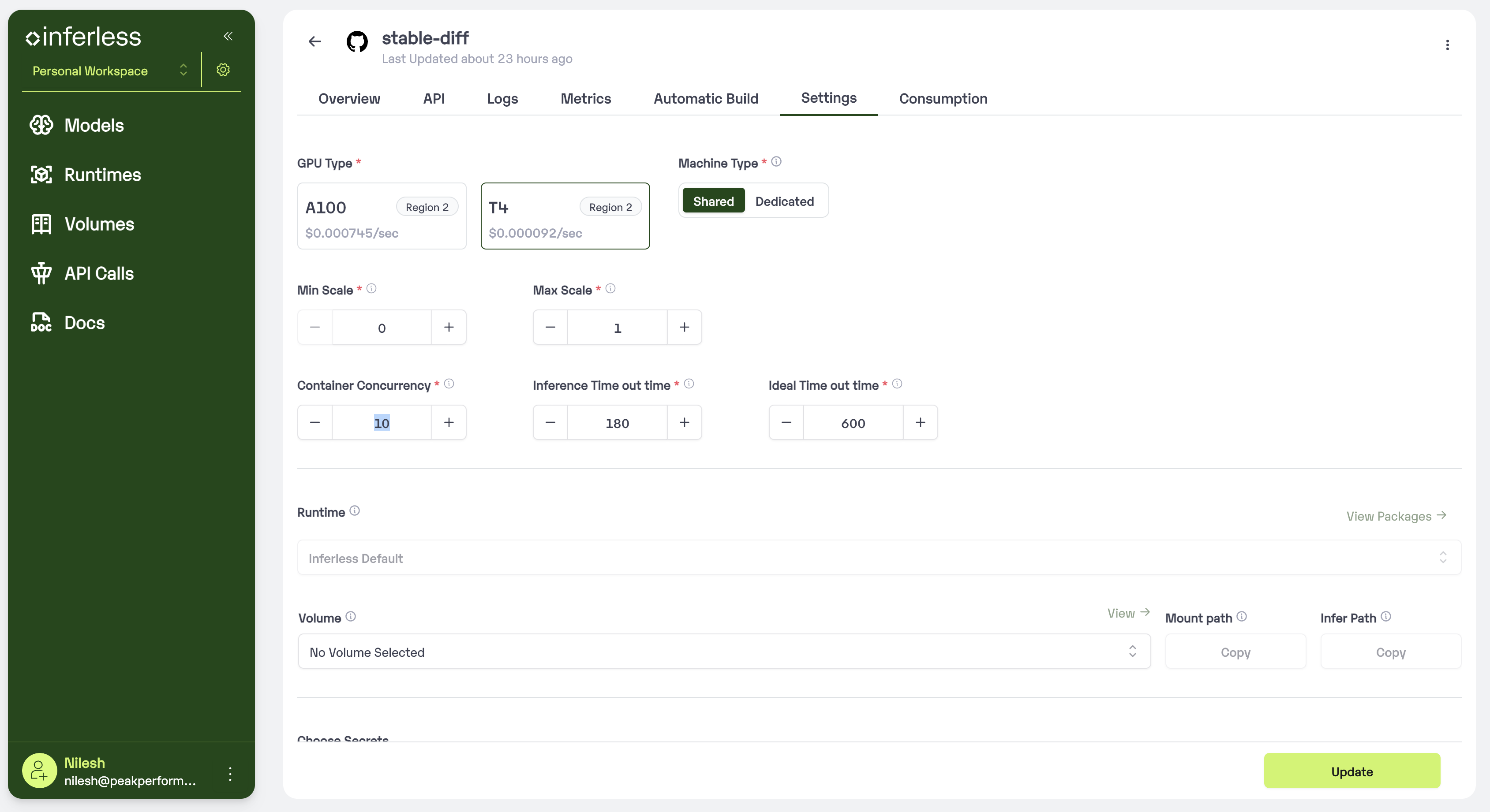 Set the Container Concurrency to 'desired\_number' and click on Update. You can set any value between 1 to 100.
## Batch Processing with Queue
This method processes the requests in batches by the same replica. This is useful when you have tasks that take longer to process and want to process multiple requests simultaneously.
#### Step 1: Preparing the model to handle concurrent requests
Define the BATCH\_SIZE and BATCH\_WINDOW in the **input\_schema.py**
input\_schema.py
```input_schema theme={null}
BATCH_SIZE = 4
BATCH_WINDOW = 5000 # milliseconds
```
More on batching can be found [here](/concepts/dynamic-batching)
#### Step 2: Configuring the model to handle concurrent requests
Go to Model Import -> Settings
Set the Container Concurrency to 'desired\_number' if. e 4 and click on Update. You can set any value between 1 to 100.
Set the Container Concurrency to 'desired\_number' and click on Update. You can set any value between 1 to 100.
## Batch Processing with Queue
This method processes the requests in batches by the same replica. This is useful when you have tasks that take longer to process and want to process multiple requests simultaneously.
#### Step 1: Preparing the model to handle concurrent requests
Define the BATCH\_SIZE and BATCH\_WINDOW in the **input\_schema.py**
input\_schema.py
```input_schema theme={null}
BATCH_SIZE = 4
BATCH_WINDOW = 5000 # milliseconds
```
More on batching can be found [here](/concepts/dynamic-batching)
#### Step 2: Configuring the model to handle concurrent requests
Go to Model Import -> Settings
Set the Container Concurrency to 'desired\_number' if. e 4 and click on Update. You can set any value between 1 to 100.